OpenEvidence: Smart Medicine or Smart Marketing?

OpenEvidence is an AI-powered medical search platform launched in 2022 by Harvard‑affiliated founders Daniel Nadler and Zachary Ziegler, and cultivated via the Mayo Clinic Platform Accelerate program. It claims to sift through peer‑reviewed sources such as NEJM and JAMA, providing AI‑generated answers with citations. Free access is granted to verified U.S. healthcare providers, funded by advertising.

OpenEvidence reportedly scored a perfect 100% on the USMLE and has secured $210M in funding and carries $3.5B valuation which is attributed to rapid adoption by U.S. physicians according to Forbes. It seeks to address the problem of information overload and the sorting through it all that physicians face to stay up to date. Because it is free and it isn’t considered a diagnostic tool (even though I think many doctors can be using it that way), OpenEvidence doesn’t require FDA approval and it doesn’t have to compete for subscription dollars (individual or institutional) like other products such as DynaMed, UpToDate, and ClinicalKey.

Instead of relying on subscription dollars, OpenEvidence relies on advertising for income. With over 430,000 doctors registered and an additional 65,000 per month (according to the Forbes article), those are a lot of eyes and information that can be used by pharma and other medical advertisers. OpenEvidence does say, they do not share personalized information. So, while an individual user’s information is not shared, the aggregate data like the number of cardiologists using OpenEvidence might be. In September 2025, OpenEvidence bought an artificial intelligence advertising startup company, Amaro which specialized in “end-to-end advertising optimization using intelligent automation. Its technology is designed to help companies streamline deployment and maximize performance across digital channels.” So, it wouldn’t be a stretch to envision that OpenEvidence could say to a potential advertiser that they have X number of cardiologists, Y number of oncologists, Z number of endocrinologists, etc. and can offer targeted advertising to those users in those specialties. So a pharma company could have their statin drugs show up whenever a cardiologist does a search, oncologists would see their immunotherapy drugs, and insulin ads would show for endocrinologists when they search. So, the advertising would be agnostic of the search and information retrieved but would follow user profiles to target advertising.

This type of advertising in medicine isn’t new. Back in the day (I feel old saying that) when scientific journals were in print, not online. The publishers had the aggregated data of their subscribers and sold print advertising in their journals much the same way. It would not be unusual for advertising for drugs or other medical devices to be on printed on the back of research articles within the journal. Publishers would know their subscribers and would place ads directed to cardiologists in the journal that was sent to a cardiologists home or office. Advertisements for other products would go into journals sent to peoples’ homes or offices based on their discipline.

So now we know how OpenEvidence gets its money, or how it intends to. What makes it so great? Short answer…I don’t know. I am not a doctor or nurse. I don’t treat patients. So I don’t have an NPI to register for an account. I am uncertain of their rationale lock it to only a person with an NPI. Whether it is OpenEvidence’s myopic view of a “healthcare professional” or strategic opacity to maintain a competitive edge (which isn’t an unfounded concern: see how competitor impersonated physicians to access & hack OpenEvidence), that drives the NPI access requirement. But those of us who are involved in medical information and research (such as medical librarians) don’t have an NPI and can’t test or evaluate the product.

The Forbes article is full of glowing reviews from individual doctors detailing how much time it has saved them or pointed them to areas where they could expand their research. A quick and dirty search on PubMed for OpenEvidence yielded 18 citations (as of November 6, 2025), some of which review it or compare it to other products for clinical care.

The subject matter definitely “mattered” when it came to how well OpenEvidence performed. Apparently, for evaluating structural heart defects, ChatGPT performed better. (Struct Heart 2025 Jul 5;9(9):100696. doi: 10.1016/j.shj.2025.100696) But when it came to searching for the National Comprehensive Cancer Network (NCCN) guidelines for basal cell carcinoma and squamous cell carcinoma (SCC), OpenEvidence “scored significantly” better than ChatGPT. (Int J Dermatol 2025 Jun 5. doi: 10.11/ijd.1783)

Several studies evaluating OpenEvidence alone or against other resources such as ChatGPT, other AI programs, or UpToDate were somewhat limited in my opinion. One study, disappointedly only looked at 5 cases….really is that a true test? Others looked at the use of OpenEvidence for patient education material or discharge material. While OpenEvidence does provide the ability for physicians to “Write a Patient Handout,” I question whether a program that has medical information intended for clinicians is able to generate appropriate patient education material at a suitable reading level. (The AMA recommends patient education material should be at 5th-6th grade reading level.)

I think the editorial by Patel, et al. OpenEvidence: Enhancing Medical Student Clinical Rotations With AI but With Limitations brings up some important concerns.

Some of those listed in the editorial are:

  • Lack of search precision – inability to search for specific articles, authors or journals which is extremely important…especially if you know of a specific study or article on the topic.
  • Opaque curation – OpenEvidence is not clear about its article selection and ranking. This is important as medicine needs to be very clear about the evaluation of evidence.
  • Limited interface – It lacks the ability to clarify queries or work interactively like programs such as ChatGPT.
  • Inconsistent Evidence – For example, authors said it “identified buspirone usage in OCD but missed additional supporting studies, limiting scope and confidence.”

As a medical librarian, I share those same concerns. I am especially concerned about the evidence within OpenEvidence, ability to access the source material, and a lack of medical professionals and information professionals on the OpenEvidence Team.

Where and what material are they using? We know that they have content from NEJM and JAMA, but what other quality resources do they have access to? Are they able to get behind the firewall of publishers’ content to provide information.

What ability do clinicians have to access the source material? Users cannot access their institutional holdings by connecting OpenEvidence to an institutional authentication system to access the full text of the journal articles. I have talked to a lot of smart computer people who think they just need to include the DOI so people can get the article. They are very smart computer people but very unaware of how hospitals, medical schools, and libraries license journals for medical professionals to read. *Note I did field a question from a doctor using OpenEvidence about adding OpenAthens (an authentications system) to access the full text of journals. But we use a different authentication system so I was unable to help him or even verify if using OpenAthens is even possible.

Of the 26 people listed on OpenEvidence’s team, only one has an MD. The rest? A ton of computer scientists, mathematicians, and statisticians. Smart people, no doubt, but wouldn’t you want more than one medical professional curating clinical evidence? It’s deeply concerning that a product claiming to revolutionize medical decision-making has so few actual medical professionals on the Team. And let’s not even talk about the complete absence of information professionals (you know, the people trained to evaluate, organize, and retrieve medical literature).

But, I get it. Medical librarians are kind of like the power company: nobody thinks about us until the lights go out…or until they need an obscure case report, or full-text article buried behind a paywall and their “Google it” approach fails. Still, if you’re building a tool to sift through clinical evidence, maybe – just maybe- you should include the people who specialize in doing exactly that. The omission feels less like an oversight and more like a typical Tech Bro blind spot: build fast, break things, and forget the people who’ve been quietly keeping the lights on in medical research for decades.

So can I recommend OpenEvidence? I don’t know…and that’s exactly the problem. It’s the latest AI-powered darling of medicine, launched by Harvard-affiliated founders and backed by $210M in funding. It’s free for verified U.S. physicians and medical professionals with an NPI, monetized through advertising, and praised for saving doctors time. But as a medical librarian, someone trained in evidence evaluation and information retrieval, I’m locked out. No NPI, no access. That means I can’t assess its sources, search precision, transparency, or even help clinicians connect it to the full text of the citations. When the very people who specialize in evaluating medical information are excluded, it raises concerns. Until more voices from the information side of healthcare are included and kick the AI’s tires, it’s hard to fully know if OpenEvidence is smart medicine….or just smart marketing?

*I used AI to aid in my research and writing of this post
MedEd Podcast: The Future of Medical Libraries: Evolving Roles in Research, Education and Clinical Support

I am excited share the podcast, “The Future of Medical Libraries: Evolving Roles in Research, Education and Clinical Support” where we talk about the rapidly evolving field of medical library science. No longer keepers of information, the librarian’s role has shifted to that of enablers of research and education in a digital age. Dr. Tizzano and I discuss trends such as artificial intelligence, hospital mergers and the challenges of funding and access in medical libraries. We also dive a little into the problems of fake medical information/news, the importance of systematic reviews and the critical support librarians provide to healthcare professionals.

Enjoy and please feel free to forward to anyone who may not realize the benefits of having a medical librarian in their institution.

Comment on: What are your thoughts? What other ways can medical librarians be involved in the future of healthcare, medicine, biomedical research? What are some barriers as well as opportunities to our involvement?

Your Cell Phone and Searching PubMed: Full Text May Not Work

Wow time flies when you are having fun, or staring at the screen of your cell phone.  Did you know it has been over 10 years since the first iPhone was released?

According to an article in Computerworld “Nine of 10 healthcare systems plan significant investments in smartphones and secure unified communications over the next 12-18 months.”  (April 4, 2018) More and more hospitals systems are providing cell phones to their care givers and integrating their usage into their workflow (access the EHR, lab results, pharmacy orders, etc.) The cell phone is the individual’s portable computer. An older (2013) report stated 74% of their surveyed physicians used a smartphone for professional purposes which included using diagnostic tools, drug information, and reading articles. Back in 2013 they stated the most often used app on a tablet was an app for medical journals/newspapers/magazines followed by diagnostic apps. In 2017 the Physicians Practice 2017 Tech Report, shows that reading journals on a mobile device is still very popular. In this survey it was the second most reported activity physicians did when using their smartphone at work.  Looking up drug information was first, reading articles was second and looking up diagnosis and treatment information was third. Of the responding physicians, 64% reported using mobile technologies for reading journals online (slide 12). The need to read articles on a mobile device has remained important to physicians over the years.

Not surprisingly medical libraries have been adapting to this for some time. Many libraries have optimized their websites to be more mobile friendly. Lots of libraries have web pages or libguides dedicated to mobile apps (just a few examples: HSLS University of Pittsburgh, Becker Medical Library Washington University, Health Sciences Library UNC) The demand for reading journal articles on mobile devices is big. Browzine and Read by QxMD are the two main apps for reading journal articles online.

Our patrons rely upon full text information being available. They want to access the full text of an article quickly and easily. Why do you think Sci-Hub got so popular? Science reported “many users can access the same papers through their libraries but turn to Sci-Hub instead – for convenience rather than necessity.” Given this information, it is important that access to the library’s full text article be easy to access when searching the literature databases, regardless of the device used. So it surprised me the other day when I was struggling to help a physician access the full text of an article when they were using PubMed on their cell phone. We tried everything, but it always resolved out to the publisher (not always the way we own the article). It did not use not our Outside Tool that we set up.  I even tried finding a way tap the link that says go to full website. No dice.  We could not access the library’s subscribed journal article in PubMed on the cell phone. Surely I was missing something obvious.  Surely NLM has figured out away in 2019 to connect physicians to their library’s full text collection while searching PubMed on their cell phone.

Well I was wrong. I reached out to NLM and a person from the MEDLARS Management Section responded they “don’t currently offer a way to populate library links (via Outside Tool or LinkOut for Libraries) on the mobile PubMed site. If the URL to the publisher happens to activate IP authentication on the publisher end, your users will get access via your subscription.” Basically that means IF your user is ON your IP range AND you get the article from the publisher (not via consortia, full text database, or other means) THEN your user can get access. That is not good. Even on campus, a lot of articles are inaccessible. Off campus…well nothing is available.

So what are other librarians suggesting to their patrons?  Our patrons use Browzine to keep current with their favorite journals and they love it. But what do you suggest for people who search for articles on a topic? Are you still encouraging them to use PubMed from the cell phone even though access to full text articles will be difficult and frustrating for them? Are you suggesting other sites or apps for searching MEDLINE? What about Ovid MEDLINE? Or is this question pointless because everyone searches Google, gets frustrated accessing the full text  and runs to Sci-Hub?

I am very interested in hearing other librarians’ thoughts on what mobile apps or mobile friendly sites they use to search MEDLINE that preserves the library full text linking. Leave a comment.


Research Impact Part 1: Moving Away from Tracking Authors’ Articles

I have been toying with this post for quite a while, trying to think of a good way to present the information without it being to long.  Well the only way to do it is to break it into parts.  I will link all of the parts together once I have finished writing and posting them.

Part 1: Moving Away from Tracking Authors’ Articles

Before I was a medical librarian my library had been tracking every article, book, and book chapter that somebody within the institution authored.  It used to be a list that was published then it evolved into a database that was on a citation management software.

In the beginning it started with finding citations in PubMed.  But it evolved over the years to finding citations from other databases.  Basically the librarian in charge of finding the citations had MANY saved searches on PubMed, Scopus, Web of Science, etc. that had the institution’s name in address of the author.   She would then download the citations, verify the author, and then add the name(s) of the department(s) that the institutional author(s) belonged to as a keyword field in the citation management software.

Books and book chapters were always a booger.  Their is no PubMed for books so finding those relied on a lot of web searching, notifications from our book suppliers, and from the from institutional authors themselves.  That information was also uploaded into the citation database.

However this practice was unsustainable for many reasons.

There are over 1800 variations of my institution’s name in PubMed.  From what I understand PubMed does no authority work for institutions.  Whatever the author writes is what is used.  This a HUGE problem if you are searching for all of the citations written by people in your institution.

In 2015 we had over 43,000 employees of which 3,200 were staff physicians, 10,965 nurses and over 1,500 research personnel in labs.  That’s a lot of citations to find.  While the saved searches were automated, the rest of the process needed to be to.    As the hospital system grew it made finding, verifying, indexing (adding the department names) uploading citations and maintenance a full time job for one librarian and became part of the duties for 3-4 other people.

At some point in time during the years of compiling a list of all the articles, books, and book chapters our authors wrote, administration decided to try to rank the citations.  Administration decided to compare the department(s) list of published articles.  Because we were still hand coding departments and loading the citations into a static reference database (like EndNote, RefMan, RefWorks) there was no way to add a continually changing variable like h-index, impact factor, or other metrics.  So they did the imprecise method of just having somebody sort all of the department(s) articles by the impact factor of the journal it was published in.  (Yes, that sound you hear are librarian teeth gnashing.)

As you can imagine this always presented issues, specifically for disciplines whose top journals don’t have huge impact factors like NEJM or JAMA.  Yet we were limited by our retrieval and storage capabilities and administrations (understandable) demand to quantify quality.

Something had to give, and it did.  Our entire database was housed on RefMan.  (Hey RefMan was state of the art when we started down this path.) RefMan was no longer supported by its maker as of December 2016.  We couldn’t migrate the data over to EndNote for two major reasons. One, all of the indexing we did to make sure we could sort people by department was done in the notes field.  We used other fields in RefMan for other “notes” and purposes.  This was all done by a cataloger so there was really good consistency, but the notes field and other fields did not map well between RefMan and EndNote so there would have been EXTENSIVE cleanup for 20 yrs worth of data. (not the best use of time or resources)  Two, migrating everything to EndNote still did not solve our metrics problem, assigning a value to the published articles that administration wanted. This forced our hand to make major changes such as automating the entire collection of citations procedure, including article level metrics within the database, and making it more sustainable as our institution continues to grow.

Through our investigations we discovered several products out there, Converis, InCites, Profiles, Pure, Plum, the list is large (note I don’t agree with all listed on Wikipedia but gives you an idea).  We ended up choosing two products by the same vendor. The two products allowed us to upload HR data so that articles would be automatically sorted and indexed by author AND department, and it also included article level metrics that were more informative than just the journal impact factor.

Migrating to this was not an easy task.  Part 2 will talk about the migration and things we learned (still learning) and I think Part 3 will talk a bit about the cultural shift from moving away from a cumulative list of publications to a list of publications’ impact.  Stay tuned.


Odds & Ends of possible interest

Useful FireFox extensions :

  • Distill

This allows you to monitor a web page  for any changes. You can highlight just part of the page (handy as some pages  change a lot  with tweets or whatever so you want to avoid that) and it will track changes only in that section – useful if looking for a report to appear, update to a publication. The only tricky thing with it is that  when you highlight a section the Save changes icon you want is bottom right (took a while to find that)

  • Lightshot and Awesome Screenshot  Plus

Both of these make capturing and annotating screenshots  very easy which is useful for training  materials, highlighting problems  via emails etc

  • Copy as plain text

Just a little  thing but find it useful. Adds a  right click option to a highlighted  items in the browser  such that  you can copy as  plain text and don’t have formatting carried over  into whatever you are  copying into

  • Vimperator

Essentially it converts links into numbers and you can “click on the link” by typing the relevant number so in a sense  creates  keyboard shortcuts  for websites. Could be useful with any web interface used frequently.

  • Lastpass

Oldie but a very goodie – only ever have to remember one password.


Other bits and pieces:

PubMed for Nurses  tutorial

UpToDate now more useful  for those that subscribe

There is now a specific ClinicalKey app (rather than just a mobile optimised site) but apparently only available in the US for the moment

Booko price alert. Booko is useful for finding the best prices for books (including delivery). It now has a feature where for a given item you can set a price target and be alerted when price drops below your nominated figure. This feature is below the book cover image.

Move between browser tabs. It is quite easy to get caught out using alt-tab when all you actually want to do is move between tabs of the browser. Ctrl-tab works for most browsers so you just have to think ctrl instead of alt

On the Wards. This is a website for junior docs containing podcasts, blogs and videos. The podcasts are interviews with senior clinicians that discuss common questions and case based scenarios that junior doctors will face on the wards etc

A few new useful(?) MeSH headings for 2015 – Legendary creatures, Long term adverse effects, Smartphone, Spirit possession, Giraffes, Hoarding disorder

Continuing with MeSH. MeSH On Demand identifies candidate subject headings from text pasted into the search box

Two newish PubMed alerting services – Medumail and MedSubscriber

Papers, the reference manager, for iPhone and iPad is now free

British Medical Library Association book prize winners 2015 for possible book purchases

WriteCite Builds citation as student enters details so they can learn the structure

The Cloud Catalog: One Catalog to Serve Them All

And with that it is time now for a coffee

InTOCicated by eTOCs

As you might gather from the post title, I love journal alerts (aka eTOCs) and here’s why:

  • They increase use of our expensive ejournals
  • They help keep clinicians up to date in their specialty
  • They repeatedly remind clinicians that the medical library exists; no small thing in these Googlesque days
  • They can be used to cross promote other library resources, services and news

We are a relatively small hospital library (two staff) which services around 5000 clients. Over the years, our ejournal alert service has grown to around 700 journal alerts, and is probably our most popular service.

The way it works is that all journal eTOCs come through one email and are forwarded to alert groups automatically via rules.

Our organisation used to have Groupwise for its email system and rules worked well with it. However on switching to Outlook, we quickly found that we could only create half a dozen or so rules before memory limitations were reached. After some searching, we found an Outlook add-in called Auto-Mate from Pergenex which came to the rescue. It’s an easy to use but powerful add-in, and it’s strangely gratifying to watch it automatically forward dozens of eTOCs each morning.

While signing up for eTOCs is a one off task, and forwarding of emails is automatic once rules have been set up, creating and modifying ejournal email groups is the most labor intensive part of the service. If I was to start the service again, I’d probably do it at the subject level (eg cardiology) rather than the title level (eg BMJ) as this would reduce the workload involved in adding and removing users from groups.

With a previous post – exporting Google Scholar citations to reference managers – I Kraftily used it as a Trojan horse to seek an answer to issue. Thanks to responders Farhad, Christine and especially Karen who provided the solution.

In a similar vein, I’m hoping a clever commenter out there can shed light on the following question:

Is there a way to have an online web form such that a user can make multiple selections (for the various eTOCs they are interested in) and which on submission updates multiple email groups (corresponding to the eTOCs they have selected/deselected). The email system doesn’t necessarily need to be Outlook. I thought this would be relatively straightforward process but as yet haven’t been able to find any offerings like this, despite playing around with the likes of MailChimp.

The JournalTOCs service has something like this available but our resolver wouldn’t work with their system alas alack alay

In any case, I remain a big fan of eTOCs and would be interested to hear if any other libraries have any comments, are using them in interesting ways or have any technology (not RSS ) that streamlines the process and so on

Thanks Rob

Yes? Or No? Or HOW? Catching a Predator at Birth (Maybe)

Catching a Predator at Birth

I almost called this post: “Create attention for your article; write a layman’s summary,” which was the subject line from the e-mail we are discussing locally in trying to decide if it is a predatory publisher or not. (Short version of what we did for those who don’t have time to read the whole story: Identity, Authority, Credibility, Language, Editing, Timing, Licensing, Accessibility, Openness, Sources, Resources. Basically, defining a chain of trust.) I’ve blogged here before about the idea of layman’s summaries, a.k.a. plain language abstracts. They have a great tagline. It’s a great idea. My first reaction was, “How can we help?” Obviously, I think the idea is awesome, and I’ve thought so for a very long time, many years. I am far from the only person to think so. Just take a quick look at these few selected quotes.

DC Girasek: Would society pay more attention to injuries if the injury control community paid more attention to risk communication science?
“We also need to call attention to the injuries that continue to take lives, despite the fact that solid solutions for them have been published in our scientific journals. We need research on translating study findings into public action. Epidemiology and engineering remain central to the field of injury control. We must look to the social and behavioral sciences, however, if we hope to overcome the political and cognitive barriers that impede our advancement.”

Alan Betts: A Proposal for Communicating Science
“Given that the future of the Earth depends on the public have a clearer understanding of Earth science, it seems to me there is something unethical in our insular behavior as scientists.”

Jason Samenow: Should technical science journals have plain language translation?
“Some scientists might resist the onus of having to write a lay-person friendly version of their articles. However, I agree with Betts, it’s well past time they do so”

Chris Buddle: Science outreach: plain-language summaries for all research papers
“1) Scientists do really interesting things.
2) Scientists have a responsibility to disseminate their results.
3) Scientists do not publish in an accessible format.
This is a really, really big problem.”

Chris Buddle: A guide for writing plain language summaries of research papers
“A plain language summary is different because it focuses more broadly, is without jargon, and aims to provide a clear picture about ‘why’ the research was done in additional to ‘how’ the work was done, and the main findings.”

Lauren M. Kuehne and Julian D. Olden: Opinion: Lay summaries needed to enhance science communication. PNAS 112(12):3585. doi: 10.1073/pnas.1500882112
“But rather than an unrewarding burden, scientists (and journal publishers) should consider widespread adoption of lay summaries—accompanying online publications and made publicly available with traditional abstracts—as a way to increase the visibility, impact, and transparency of scientific research. This is a particularly important undertaking given the changing science media landscape.”

This is seen as SUCH an important idea that multiple grants were provided to create a tool to assist scientists in doing this well!

Center on Knowledge Translation for Disability and Rehabilitation Research (KTDRR): Plain Language Summary Tool ((science OR research) (attention OR “plain language” OR “clear language” OR layman OR journalist) (summary OR abstract)

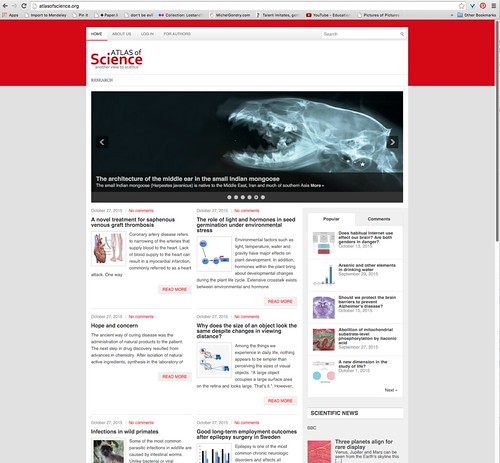
Imagine my excitement when a colleague (many thanks to Kate MacDougall-Saylor) alerted me to a new online publication specifically for this purpose! How PERFECT for Health Literacy Month! A faculty member had asked her if it was a legitimate enterprise. So we looked at the email she’d received, and at the web site.

Dear Dr. XXX,

We are interested to publish the layman’s summary of your research article: ‘ABC ABC ABC.’ on our website.

The new project ‘Atlas of Science‘ started from 1st October 2015. It is made by scientists for scientists and the aim of the project will be publishing layman’s abstracts of research articles to highlight research to a broader audience.
Scientific articles are often difficult to fathom for journalists, due to the scientific jargon.
Although journalists like to assess the news value quickly, that is by no means simple with most research articles. Writing a short, understandable layman’s summary is a good means to reach this goal.

This makes sense, has a good message, and is accurate about the potential impact so far, but the English doesn’t read as having been written or edited by a native speaker of English, and the formatting is inconsistent. It doesn’t look as if a professional editor did a final review before promoting to the world. Warning Sign #1.

The name of the web site (Atlas of Science) is identical to the highly regarded book from MIT Press and authored by Katy Börner of the Indiana University Cyberinfrastructure for Network Science Center. At first, I thought perhaps they were connected, but quickly realized this was a separate group, simply using the same name. Warning Sign #2.

Most of the rest of the message came directly from the “For Authors” page on the web site (Why, What, Use), except for the instructions.

Submit
∙ Send your summary to [email protected], not later than ##/#/2015.

What do we do with your layman’s summary?
∙ We check the text, and in consultation with you we dot the i’s and cross the t’s.
∙ Your text will be available on the Atlas of Science website, www.atlasofscience.org .
We will actively promote this site to the press.

Please, let us know if you are interested and do not hesitate to contact us if you have any question (simply reply to this email).

This was less worrisome, except … the phrase “not later than” (combined with a date of just over a week to respond) seems to be pressuring the faculty member to respond quickly, without thinking it through carefully, and without time to actually create a well-done plain language summary. Warning Sign #3.

Speaking of a well-done plain language summary, do they explain how to do what they say they want? We checked on the web site. Not really. They tell you what they want, but not how to do it, and they don’t point people to any resources to help them understand what a plain language summary is, what this means, or how to do it. They define no standards, set no guidelines, make only the barest and simplest recommendations (such as word count — 600 words with 2 figures), and do not even mention appropriate reading level. Warning Sign #4.

Does the posted content on the site actually appear to match the stated goals of the site? Not remotely. The pieces posted don’t even match the minimal guidelines they stated in their own criteria. I tested a few of the newest posts. The titles alone (“Regulation of mediator’s expression and chemotaxis in mast cells”, “Minute exocrine glands in the compound eyes of water strider”, “Gene therapy not just counseling for your denim obsession”, tell you these are not plain language, but just to be fair and unbiased, I ran them through a Simple Measure of Gobbledygook (SMOG) Tool, which is only one of several tools and resources available for assessing readability.

Regulation of mediator’s expression and chemotaxis in mast cells
The SMOG index: 20.1
Total words: 766
Total number of polysyllabic words: 180
Total number of sentences: 41

Over 150 words more than the defined limit for the abstract (Warning Sign #5), and written for an audience with a reading level matching those with multiple graduate degrees. The SMOG Index, you see, displays the reading level by number of years of education. 12 is a high school diploma, 16 is a college degree, 18 is a masters, and 20 is well into PhD territory. The average reading level for adults in the United States is roughly 8th grade, meaning that a really well done plain language summary would be written to a SMOG level of 8, at most 12. 20 is a long ways from 12.

Minute exocrine glands in the compound eyes of water strider
The SMOG index: 16.2
Total words: 461
Total number of polysyllabic words: 70
Total number of sentences: 35

Gene therapy not just counseling for your denim obsession
The SMOG index: 18.7
Total words: 573
Total number of polysyllabic words: 79
Total number of sentences: 23

Save your pancreas from diabetes! Your beta cell reserve is critical for prevention and treatment of diabetes.”
The SMOG index: 19.6
Total words: 455
Total number of polysyllabic words: 100
Total number of sentences: 25

It’s easy to see that most of the authors take the word count seriously, and that some of them genuinely tried to reduce the reading level and had an idea of where to start with this. None of them came anywhere close to an 8th grade reading level, and none of them were below college graduate reading level. Warning Sign #6. The writing in the abstracts was highly variable, some included grammatical errors, and there was no sign of editorial oversight. Warning Sign #7.

You get the idea of how the checking is being done. I don’t want to walk you through the excruciating details for every piece, but here are a few more criteria, and then ending with a surprise reveal.

“About Us”: Can’t tell who they are, either individuals or institution. Improper grammar & punctuation. No contact information. Contact form has email address hidden. Warning Signs 8, 9, 10.

Content Sources: Most links are to RSS feeds from major science news services, not unique or locally produced content. For the unique content, authorship is unclear (is author of the plain language abstract the same as the author of the original article?), buried deep in the page, no editor mentioned, and no contact information given for the presumed authors. The links for the original articles go back to PUBMED, not to the original publisher, and nont of them give the DOI number for the articles. Warning Signs 11, 12, 13, 14, 15.

Licensing: For a project of this sort to have the impact it is supposed to on journalists and the public, it would need to have a Creative Commons licensing structure, presumably with attribution. Instead it has
copyright, all rights reserved,” but gives no information on how to get permission to use the content. It appears that the intellectual property rights are held by the website, not by the actual authors. This is (in my opinion) terrible. Warning Signs 16, 17, 18.

Accessibility: Problems using the site on my phone. Tested desktop view, and there are a number of fatal errors, missing ALT tags, empty links, duplicated links, etc. Sloppy, sloppy coding. Nobody’s perfect, but MEDLINEplus has zero fatal errors, just for comparison. If this is from a reputable organization, I’d expect better. Warning Signs 19, 20, 21.

Now, the big surprise! While I was digging around online, I found some of the content, almost verbatim, from an authoritative site! Virtually all of the “For Authors” page is from the Technishe Universiteit, Eindhoven (TU/e). Evidently, they have or had a requirement for graduate students to write a plain language summary of their research prior to graduation. Brilliant concept! The submitted content was reviewed, edited, and selected for possible inclusion in their university research magazine, Cursor. They also had a campus website to host the content. The link for this was broken when I checked today, but the Wayback Machine has several examples over the past several years, including just a few months ago.

The big question now is whether this project is taking the Technische Universiteit model and making it bigger for the world, or was the content stolen from TU/e? There is no way to tell by looking. If this is a genuine project from TU/e, there are some changes they could make to improve the project. If the project is not theirs, I would really love to see the National Library of Medicine recreate a project like this, but done properly. They’ve proven they can. And there is a genuine need.

First ever all-virtual conference

I love conferences: meeting other librarians, learning about new products and services, and getting great ideas from others’ innovative projects. However, it is always hard to get away to go to conferences. Both the time and funds can be hard to find. This is why I was so excited for the first-ever virtual conference by the Midcontinental Chapter of the Medical Library Association (MCMLA). This was also the first ever all-virtual meeting of any MLA chapter in the history of the organization. I did not have to find money in my budget or time in my schedule, but still was able to attend many informative conference sessions. And, I got to attend the conference while wrapped in my fleece blanket.

I know the virtual conference has been years in the making from many dedicated librarians, but they made it look easy. Also, Elsevier, McGraw-Hill, Wolters Kluwer, and Rittenhouse agreed to participate in this experiment and gave presentations about their new products. Overall, the conference had great presenters, engaged participants, and moved smoothly past the few, small technical glitches that occurred.

Check out #MCMLA2015 to see the Twitter discussions during the conference and go to the MCMLA conference page for more details about the meeting and the poster that was presented at MLA 2015 about the virtual conference. I hope this is only the beginning of associations experimenting with virtual conferences and exploring alternative ways of sharing ideas and research with each other.

Exporting multiple Google Scholar citations to reference managers like Endnote

Google Scholar (GS) is a very useful addition to the searchers arsenal; following a “cited by” trail nicely complements results retrieved by keyword/subject heading searches in databases such as Embase and Medline.

One area where GS is less useful is exporting records to reference management software. Using the settings,  you can set up an export to BibTex, Endnote, RefMan and RefWorks. However, there are two limitation:

  1. You can only export a single record at a time
  2. You don’t get the abstract included

GS, after a little fiddling about, does allow you to save citations to a list (My library) but citations in this list can still only be exported one at a time so this produces no benefit at all. Then I read an interesting pager by Bramer and de Jonge – Improving efficiency and confidence in systematic literature searching* – which mentioned that Harzing’s Publish or Perish can be used to download 1000 references from GS into reference managers such as Endnote.

Could this speed up my click by click populating of Endnote libraries with GS citations (and maybe throw abstracts in as well for good measure)?

Publish or Perish, ” designed to help individual academics to present their case for research impact to its best advantage”, is a small bibliometrics program (approx 1 MB) that can be installed without admin privileges.  You can indeed export multiple GS (and Microsoft Academic Search) results but – alas, alack, alay – it is not the solution to problems 1 and 2 above. Abstracts – not totally surprising as GS doesn’t provide them – aren’t included.  And while you can search the Publish or Perish program in various ways (author, journal, all words etc), it just doesn’t match the way you search GS which is generally a mixture of keyword and cited by searching so you cannot easily replicate a set of results.

The subject line of this post implied a solution to the multiple GS export problem. Actually it is more a request to see if anyone else has found a fix – sorry about leading you on like that. But this issue is one of those not-so-large-but-there-must-be-a-better-way ones so I’m hoping someone can suggest a workaround.

The easiest solution would be for Google to make the My library list bulk exportable. While holding my breath and waiting for that, I wonder if anyone out there has found a clever way around this problem? Perhaps a search from Endnote GS citations to an external database such as PubMed to grab the abstracts in some fiendishly clever way?

RP

* The systematic searching paper mentioned about can be found in PDF format and Word format, with the latter incorporating a couple of corrections as detailed at the end of this post. The paper itself is interesting for giving all sort of search tips as well as providing a framework (including online macros) for translating search queries from one database platform to another (Embase into Ovid Medline etc). It also has some nifty GS search tips and a table giving a useful search syntax summary across various platforms; the PDF version is good for printing this out. Indeed it is a paper that you need to print out and read at your leisure as not really one you can just scan through online so well.

***Note from Krafty*** 10/28/15
This post seems to generate a lot of spam mail in the comments despite anti spam measures.  As a result I have disabled comments from this post. If you want to comment you must email krafty(atsign)kraftylibrarian(dot)com and if the comment is related to the post I will post it manually in the comments.  Sorry for the inconvenience. Thank you.

Wearable technologies in a library setting

Next time you are at the gym, take a look around! Look at the people on the treadmills, the elliptical or even in the bikes. How many of them are wearing wearable technologies, like the Fitbit, Jawbone’s Up or the Apple Watch.  Wearables are on the rise. Studies show that the markets for smart watches, smart glasses, personal health and fitness products will be worth USD 101.2 billion in 2018.

Wearables are not just for health tracking either. There are wearables that help companies track worker productivity (http://wearkinetic.com/); perform 3d scanning (https://www.fuel-3d.com/) and electronic glasses that help the blind (http://horus.tech/en/horus.php).

Yet, librarians have not begun to explore how the power of the wearable can be harnessed for use in a library setting. Imagine sending data to your wearable or having your wearable scanned to checkout books.  How is your library preparing for wearables?  Stay current about wearable devices by following: http://www.wearable-technologies.com/network/