Secrets of the IT Department

Mike forwarded me this article and I got a bit of a laugh out of it, “Greatest Secret of IT Revealed” which is – “your IT department really does hate you.”

All kidding aside the article addresses some interesting reasons why it can be so hard to get mobile initiatives started within business.  Although Lee Dallas does not specifically mention healthcare, much of the issues are the same.  Both organizations have data that must remain secure, just because business doesn’t have patient medical records doesn’t mean that their data is any less important.  I would be just as angry if a business’s security practices (or lack of) led to the release of my credit card information as I would be if my health records were released.

However this article doesn’t focus on the usual problem of how we want a less secure environment while IT wants/needs to keep things more secure.  There are three things Dallas writes about as barriers to mobile initiatives that I think many people forget about when trying to implement new technologies; expectation, inertia, and funding.

Expectations – We now have a consumerist expectation when it comes to technology.  Long gone are the days where professionals went to giant computers the size of your car with punch cards. Everybody has a computer at work and at home and there the lines blur.  People have “iPhone expectations,” we want the coolest thing to work…NOW! But IT is responsible for making things work for everybody which means that they have to deal with all sorts of cool things, ancient things, people abilities and inabilities. 

My favorite quote from Dallas on expectations:

“What these statements fail to consider is that user populations at all large companies are wildly diverse across all demographic measures. The next time you try to help your mother get her email just remind yourself that is only a small taste of what a help desk in a large IT shop deals with 24x7x365.”

Inertia – Bodies at rest stay at rest, bodies in motion stay in motion.  As librarians we might know a thing or two about that little principle.  If it ain’t broke don’t fix it.  Well there are a lot of systems now days that are interdependent on each other.  Mess with one thing you might effect another.  Once a system is in place it is much more difficult to replace it because people are used to it and there are other systems that use it as well. 

Funding- This is an area that we really are seeing more with mobile devices than any other library technology.  There was an old SNL skit with Steve Jobs showing off the latest and coolest gadgets for Christmas.  Each time Jobs would announce a new iPod he would declare it obsolete and replaced by another newer, cooler, smaller iPod.  In the past this revolving door of technology was primarily personal.  But now businesses and hospitals are drawn kicking and screaming into the smartphone wars, iPhone 3G, 3GS, 4, 5?, Blackberry, Android, Windows, etc.  The madness doesn’t seem to have an end in sight, yet all of us with our consumer mentalities want to do our business with these consumer devices.  The frustrating thing is that our funding systems haven’t evolved.  As Dallas says, “In large organizations, transformational project funding is often an 18 – 24 month exercise. That means even if you started your iPad project the day it launched – the iPad2 is out before you can get it into your normal procurement cycle.” Sound familiar hospital librarians? 

So as you work to add a mobile initiative in your library, consider some of these thing before you approach IT, it might just make things go smoother.  Of course if what Dallas says is true, they probably will still hate you.
Smartphones On the Cheap

If you were at MLA you would have seen the latest in librarian accessories, the smartphone.  Everywhere I turned it seemed everyone was whipping out their phone to look at their calendar to find their next meeting, monitoring the Twitter feed, tweeting, or texting somebody. 

I bumped into a few friends who were still stuck with “dumb phones” and many of them said the main barrier to getting a smartphone was cost, as they glanced at my iPhone in my hand.  That is when told them that they didn’t have to break the bank to get a smartphone.  In fact, after the meeting (and at the end of my billing cycle) I will be dumping my iPhone and getting an Android. 

Why am I moving?  You know me as the Krafty Librarian, but you could also probably call me the Thrifty Technology Librarian (or just call me cheap, that is fine too).  Currently my iPhone has unlimited data.  Still, I pay about $85/month for it.  Add my husband on to the plan and our cell phone bill is well around $170/month.  As a mom of three kids on a budget…ouch. 

Theoretically we could go back to dumb phones, but really both he and I are hooked on smartphones like kids to sugar on Halloween.  So my husband began the process of looking for a cheap smartphone.  Oxymoron, right? Not really.  He discovered that there were pay as you go plans for smartphones.  Until recently there just weren’t a lot of pay as you go smartphones. 

One such pay as you go outfit is VirginMobile.  If you buy the phone out right you have your choice of three pay as you go models.

  1. 300 minutes talk, UNLIMITED text, UNLIMITED data for only $25/mo.  
  2. 1200 minutes talk, UNLIMITED text, UNLIMITED data for only $40/mo. 
  3. Unlimited EVERYTHING: minutes, text, and data for $60/mo.

Yes you read that correctly you could get a smartphone plan with unlimited data and texting for $25/month.  Now I know you are saying, “what savings is that if the phone isn’t free and I have to buy it?”  If you got an iPhone you still would have to pay $200 for the phone and anywhere from $60-$100/month (depending on your minutes, text, and data plan).  Many times, depending on the phone, you are going to end up paying for the phone in one way and sometimes multiple ways. You have realize that if you get the phone free and are on a plan, that plan is always more expensive because they are supplementing the cost of the phone.  So pay as you go is almost always cheaper than cell phone plans. 

For us, moving to something like VirginMobile gave us a savings of around $100/month.  That was too much savings for us not to try out.  Mike, my husband, jumped ship first and tested the LG Optimus V and VirginMobile to see if it worked well as a smartphone and got reception.  I was chicken, I stayed on AT&T with my iPhone and watched his experiment.  Afterall, I am a data hog, I use at least 2GB of data each month (sometimes more) and I did NOT want to lose being grandfathered in with AT&T unlimited data plan if the experiment failed. 

VirginMobile is on the Sprint network and it does pretty well in most major cities, but if you live in the country or out in the Western Plains States it might not be the network for you.  Mike was able to get a signal and service everywhere we go in the Cleveland area.  So he let me take his phone for a week to test it.  I wasn’t able to get a signal everywhere in my building at work but I could get signal outside no problem.  The phone itself is ok.  If you once had an iPhone you will think the LG is a little clunky and not as intuitive (I really like the one home button concept on the iPhone) but it worked and it had all of the apps I like and use. 

In the next few weeks I will bid a teary farewell to my iPhone and begin to use an Android.  For a savings of $100+/month I can’t justify staying with AT&T and my iPhone. 

So if you have been wanting to get a smartphone but just felt it was too much money, you might want to check out VirginMobile, at $25/month it is cheaper than some dumb phone plans.

MLA Posts

“How do you find time to blog” is the question I get asked most often when I meet people for the first time.  Often I respond that it doesn’t take long to jot down my thoughts and that a normal blog post (not an in-depth product or database review) can take me about 10 minutes to an hour to write. 

If you watched Clay Shirky’s keynote speech yesterday at MLA (view it online here if you registered for e-conference or the regular conference) you might remember that he mentioned that there are 100 million hours put into Wikipedia which illustrates how big of a project it is.  But did you know watching television has taken 200 billion hours in the US alone every year, according to Shirky? So while Wikipedia takes a alot of peoples’ time, Americasn spend much more time on less productive activities such as watching TV.  In fact I am sort of watching TV as I write this post.  

In normal times I am able to find a few minutes out of my day to squeeze out a post.  I guess you could call the time I use to do that my television time.  However, this week I don’t even have television time to write my blog posts.  This year is the first year in a VERY long time that I am not an Official (or unofficial) blogger at MLA. I am just too busy.  This year I am the 2012 NPC co-chair and I am busy attending meetings, thanking vendors, and promoting next year’s meeting.  I am also the incoming chair for MIS and must go to MIS business meetings and section programs.  Last but not least, I am incoming MLA Board member and must attend almost everything MLA and meetings for my liaison committees.

So for once in my MLA meeting life I have no “TV time” to write a steady stream of blog posts.  I hope to write a few posts about the meeting when I get back home but in the mean time don’t forget to check out the Official MLA Meeting Blog.

Win $400 To Go To MLA 2012

How did you convince your organization to fund your trip to a Medical Library Association Annual Meeting? In this day and age where we are all doing our best with shrinking budgets and institutions are scrutinizing our travel funds, the NPC 2012 Committtee thought it would be a good idea for librarians to share with each other their methods, stories, and ways they were able to secure funding to attend an MLA Annual Meeting.

Kind of in the same spirit as the MLA Swap ‘n’ Shop, which features samples and giveaways of successful library promotions, the Get Funded for MLA Contest will feature how librarians successfully got their institution to help pay for the annual meeting so that other librarians can learn and get ideas to use to help them secure travel funds.

So stop by the 2012 booth and get your “Get Your Meeting Funded” stickers and let everyone know that they could win $400 toward the Seattle meeting.

Contest Information:

The National Program Committee for the 2012 meeting in Seattle, WA are looking for the best methods people used to justify their attendance at a meeting to receive funding from their institution. There will be two $400 prizes to be used toward either registration or travel expenses to the 2012 meeting. The two prizes will be awarded to one hospital librarian and one academic medical librarian for the most original, funny, interesting, and best method for acquiring funding from their institution.

You must submit your story online by November 1, 2011. Winners will be notified by November 25, 2011 and will be listed in the January 2012 MLA News. All submissions will be displayed online at http://mla2012contest.wikispaces.com/ and will be available for your fellow librarians to read and learn from. By participating in this contest, not only do you have the chance to win money to help pay for next year’s meeting, but you are sharing your successful funding strategies which can serve as a resource to other librarians who may need a little help getting institutional support.

To enter the contest go to: http://www.surveymonkey.com/s/2T8K9LJ

You must be an MLA member to win.

Nervous about seeing your name in lights about how you got your institution to support your attendance? That is fine. We have set it up so that you can participate in the contest but your name will be withheld from the online public site and will only be known to contest judges.

MLA Conference Online

By now you are either going to MLA or you are not.  If you aren’t going to MLA you might want to consider attending as an e-Conference participant.  It is only $100 for all of the online content, videos, slides, poster information, etc. It is a good deal and if I wasn’t going to Minneapolis, I would be attending as an e-Conference participant.

Don’t foget to also check out MLA’s CoverItLive link to watch events as they happen.

http://www.mlanet.org/am/am2011/events/conf_comm.html

Online MLA Schedule

I am sure you are all wondering why on Earth I am fussing so much with my MLA schedule and writing about the online program planner.  Well this MLA I am a little busier than others.  I am the soon to be the Section Chair for MIS, Co-chair of the NPC 2012, and I am an incoming MLA Board member.  All of it is doable, but I need a damn good schedule to keep my head on straight.

My entire personal life revolves around Google Calendar.  EVERYTHING is on it and it can be seen online by me or my husband and is synced to our smartphones.  So when I am sitting at my son’s baseball practice and the coach tells us  a game’s location and time has changed, I can easily pull up the calendar on my phone and make the edits.  The changes are saved on Google itself not on my phone.  That is important because the information is instantly updated and can be viewed on my husband’s phone or computer.  

Since my personal life is organized by Google Calendar it is natural that I would like my library life to be as well.  The online program planner in is a good idea, but it fails on a lot of common tasks that I wonder if it was tested before it went live.  There are many more events at MLA than those that are on the Official Program.  People also like to program hop.  Attend one program to see a specific speaker then dart out to see another speaker at another program scheduled at the same time.  Unfortunately you cannot add your own events to the online planner, nor can you select certain speakers to watch within programs for purpose of hopping. 

At first I thought I conquered this problem.  I uploaded my online planner to Google Calendar with the intention of adding the new programs into my calendar.  At first glance this seems to have worked but as I tried to sync to my iPhone and give the link to my schedule to friends, flaws started to appear.

The online planner imports into Google Calendar as a totally separate calendar AND doesn’t allow you to edit that calendar. (It is hard to describe so look at the photos I link to as visual references.)  If you look at this pictureyou can see that my Google Calendar and the events (that aren’t in the Official Program) I added are listed in green under my Krafty Librarian account.  The events in purple are the events that imported from the online planner under my online planner account kraftm.  The purple events are listed as “other calendars” and are not “owned” my the Krafty Librarian account, therefore I can’t alter them. 

Why is this a big deal?  Well if you sync your calendar to your smartphone (which many people do) then your phone has problems picking up your “other calendar” because it is not owned by you.  Therefore you don’t see those events in purple on your smartphone.  Also, if you are like me and need the phone to buzz you 10 min. prior to remind you of an event, you won’t get that reminder buzz.

There were a lot choice words that went through my brain when I discovered this.  However, I found out a way to add the purple events to my “owned” calendar.  Look at this picture.  If you click on the time of the purple entry you get a dialogue box with the link “copy to my calendar.” Doing that will add that event to your “owned” calendar.  Yippeee!  Now for the downside.  I haven’t figured out how you can do this en masse, the only way I have found that works is clicking on each event individually.  Yeah no more yippee.  But the process works.  If you look at this picture, you can see that I was able to successfully add all of my purple events to my “owned” calendar.

By doing all of that my calendar now syncs nicely with my phone.

However, this is a big pain in the but.  I would have given up long ago if it weren’t for how crazy busy I will be and my obession with scheduling and syncing everything through Google and my phone. 

Additionally, one of the biggest features of the MLA online planner is that your friends are able to see your schedule.  This is very helpful if you are trying to meet up with somebody.  For example Nikki Detmar plans to do some geocaching while at MLA. I have been interested in doing this because I think my boys might like it.  So tweeted back that I would be interested in going with her and she said she would check my schedule on the online planner.  Ooops, that totally isn’t going to work.  If you look at my schedule on MLA’s online planner it appears that I am much more available than I really am.  

I realize my example was not exactly a work related example, it was scheduling fun at the conference.  But all work and no fun makes Krafty a very dull girl.  Plus it was a very good example of how the online planner’s inability to add other events really makes the sharing part of it pointless.  Why am I going to share a schedule that isn’t correct?  So now I have gone into Google grabbed the URL to share my calendar so that I can post it on Twitter, my Facebook, here  on my blog, and Crowdvine.   

When the online program planner first became live, it was never my intention to devote any more attention to it other than to say, “Hey it is live.”  However, I have to believe that I am not the only person out there who is struggling with the thing trying to add events, trying to get it to sync correctly, and trying display it properly so that easier to schedule a few fun or meeting related things in between MLA events.  I write this post so that others can benefit from my trials with the product.  Good luck, and next year I cross my fingers that my only post about the online planner will be, “Hey it is live.”

Friday Fun: CIA’s Most Successful Project: Facebook

This just in on the Onion News Network, “Facebook Program Drastically Cuts Agency’s Costs.”  You all know Mark Zuckerberg created Facebook, but did you know he was really a CIA agent, code named The Overlord?

“After years of secretly monitoring the public, we were astounded so many people would willing publicize where they live, their religious and political views, alphabetized list of all their friends, personal email addresses, phone numbers, hundreds of photos of themselves, and even status updates of what they were doing moment to moment. It is truly a dream come true for the CIA.”

This is one of my favorite Onion reports.  Watch it and get a good laugh, especially about what they say about Farmville and FourSquare.  Personally I think Angry Birds was more effective at pacifying Americans during the recession, but who is to argue with the CIA statistics.

Docs Can Do Social Media, Just Ask Dr Ves

Perhaps it is just my perception, but a lot of articles directed at doctors seem to stress the negative side of social media and physicians.  I would be Polyanna if I didn’t say there aren’t risks to social media, but everything in life carries risks.  Living a life without risks isn’t living.  That isn’t to say somebody should throw caution to the wind either.  Life is about managing and risk vs. reward balance. 

Dr. Ves Dimov has a very good post about a how a doctor can easily participate in social media and benefit greatly from that participation.   In his post, “For doctors: How to be a Twitter star in two easy steps,” he address the issue of time (lack of time, more specifically) and Twitter.  Specifically he says Twitter should take no more than 30 min. per day.  I have to agree with him.  I spend more time on email than I do on Twitter.  I have Twitter up and running in the background and when an interesting tweet comes across I read it or comment on it.  Takes me a total of 10-20 seconds total, perhaps a little more if they link out to an interesting article that I read.

For me Twitter at work is very similar to MEDLIB-L (the medical librarian listserv), medical librarians with questions or seeking to share quick bits of info send out tweets just like they send out emails on MEDLIB-L.  The difference between the two for me is the content.  Medical librarians on Twitter who post in general or using the hashtag #medlibs tend to post more tech related things, time sensitive things, or share good articles quickly.  MEDLIB-L tends to have more in depth questions and discussions (naturally since it isn’t restricted to 140 characters). 

For example, when the government was threatening to shut down, I received a question from a patron asking me about whether PubMed would remain running.  I have to say the first thing I did was tweet the question.  Why?  More than just medical librarians are on Twitter.  If my librarian friends don’t know the answer they can quickly RT and it goes out to another layer of people.  Think of it as an information network onion.  Your friends are one layer, their friends are another, and their friends friends are another. 

April 18th, the same day the MLA online program planner came out, there was already a discussion on Twitter about how to add things on the program and import it into a calendar.  The online program planner (and the difficulties encountered adding programs or importing it to a calendar) weren’t discussed on MEDLIB-L until May 2nd.  This is example is not to point out that Twitter is faster or better than MEDLIB-L, on the contrary I have seen things break  MEDLIB-L before Twitter.  I just use this example of how Twitter is used professionally to get short answers quickly.

I highly recommend Dr. Ves’s post for people (especially physicians) interested in Twitter.  Even those who think they aren’t interested in Twitter might like to read how easy it is to get started.  As Dr Ves says, Twitter is a good place to start if you want to get involved in social media.  It doesn’t require a lot of time to do or maintain and if you “have common sense, and never share the 18 HIPAA identifiers online or offline with unauthorized parties,” then you can minimize your risks and maximize your rewards for participating in social media.

Must Know Twitter Tips for MLA

Eric Rumsey recently on Twitter “11 Must Know Tips and Tricks for Twitter.”  I have been on Twitter for a while and I learned a lot of things from this article.  Some of the things on the article are more organizations interested in the impact of their tweets and metrics of those who follow or unfollow (good if you are running a library account).  There were a few other tips that are good for individual Twitterers like:

  • Advance Search on TweetDeck (right up librarian searchy mentalities)
  • Tweetcaster for Android users
  • Share Flickr photos on Twitter using Fick to Twitt
  • Find trending topics
  • Find deals/coupons on Twitter
  • Browse your Twitter friends

This list, plus the fact that MLA is only a week away, gave me the idea to come up with a few “must know” Twitter tips for MLA people.

Check your Settings!!

The most common questions I get from people are: “Why aren’t my tweets showing up in the hashtag stream?” “Why didn’t you see my tweet?”  The reason is most likely because you checked the privacy box, which makes your tweets only viewable to people who follow you.  The privacy box is a great way to keep your tweets private, but if you keep it checked you aren’t going to be able to effectively participate in the #mlanet11 discussions because we won’t be able to see your tweets!

Consider a third party Twitter application

Twitter page itself can be a little limited, in fact most of the things that we all know and associate with Twitter like #hashtags and @’s (replying to somebody like @krafty), were created and adopted by users, not Twitter.  I feel Twitter has been slow to exploit these helpful symbols and functions and their “new and improved” site still does a poor job of dealing with them.  TweetDeck and HootSuite do a MUCH better job.  TweetDeck and HootSuite at first blush look intimidating with its multiple column format.  But once you get used to it, it is extremely useful and easy to follow.  You can set a column just to be following tweets with the #mlanet11 hashtag.  TweetDeck is an app that is installed on a computer or your smartphone.  Hootsuite is hosted on the web, making installation on the computer unnecessary.  Hootsuite does have an iPhone app as well.  I primarily use TweetDeck but I also have a Hootsuite account so I can check tweets (without going to the crummy Twitter site) on computers other than my own. 

Take a look here to see some of my columns on TweetDeck and how I can monitor All Friends, Mentions (people who @ or RT me), and #mlanet11.

Know and use the hashtags

Your tweets won’t get picked up and seen as easily (thus limiting your conversation) if you forget to use the hashtags.  The hastag for the conference is #mlanet11.  Others you might be interested in are: #mlattt (MLA Tech Trends program) and #medlibs (tweets of interest to medical librarians). 

*If anybody has any other hashtags that are used a lot in the medical library world or for this conference, please list them in the comments. 

It may get a little tiring to constantly remember to use the hashtag, this is where a third party Twitter app may come in handy.  I know in TweetDeck if you click on the # symbol just below the text box, you can select and use a recent hashtag for your tweet instead of typing it out each time.  This is also possible on TweetDeck’s iPhone app.   Now you have to have used the hashtag a few times for it to get in the list but once you do, it is there and it is a lot easier to tap or click on it rather than typing it out each time.

Observe and experiment EARLY

If you haven’t signed up with Twitter but plan to tweet at the conference, or at least lurk on Twitter and view the conference tweets, then start early.  It isn’t hard to tweet, but you will find you get more comfortable participating by watching and responding to people before the conference starts.  Use this week to find your twitter legs.  It takes some practice getting used to sending messages in under 140 characters (including the hashtag).  If you use this time to practice reading and sending out some tweets you will feel a little more comfortable about participating during the conference.  Don’t worry if you make mistakes, many librarians on the Twittersphere are more than willing to help you out and get you in the tweeting scheme of things in no time. 

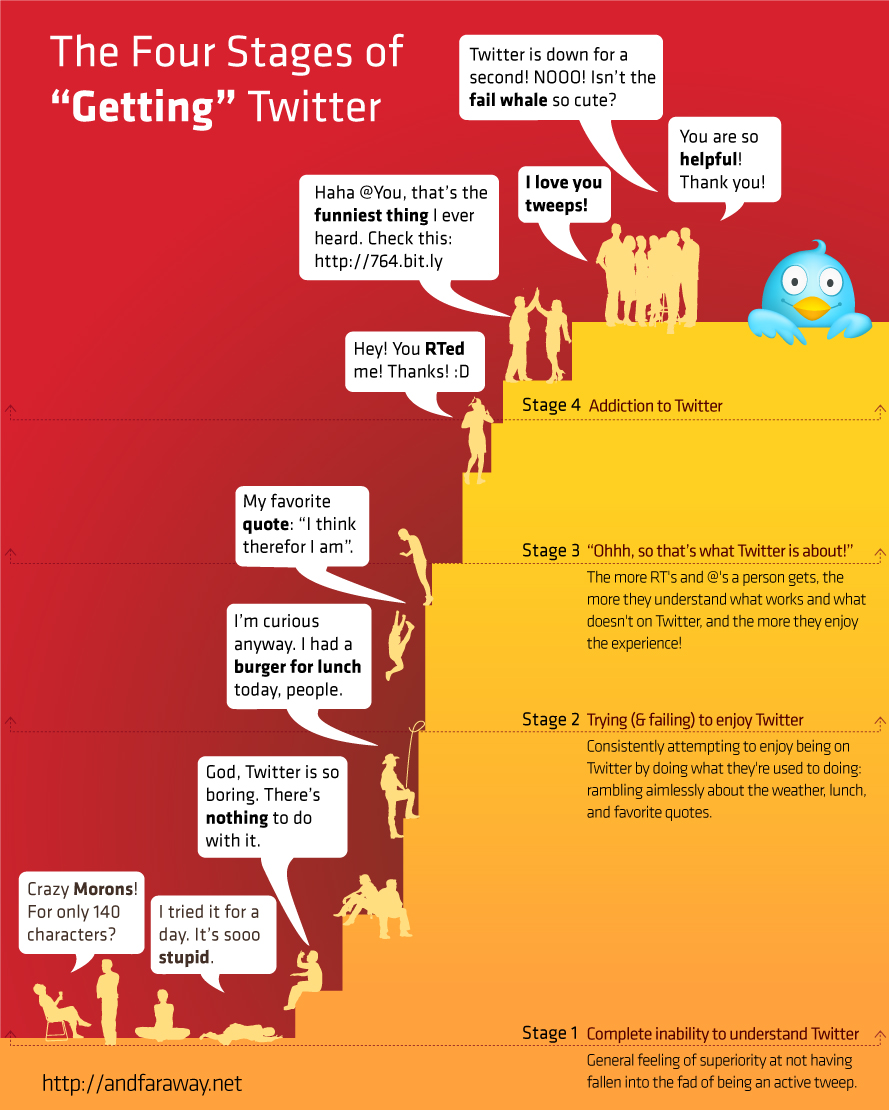
I can’t tell you how you will use Twitter.  Only through observation and experimentation will you begin to understand how it can fit in your life.  It is an evolutionary communication process (see the picture below).  I don’t mean to say that Twitter is the next step up on the communicating evolutionary train.  I mean to communicate effectively within Twitter, it is a process that you evolve within.  For example you will find it hard to state things in less than 140 characters (everybody does at first) and you might send multiple tweets to get your point across.  Eventually you will learn and your tweets will evolve to where you are able to communicate a lot of things in 140 characters.

What stage are you in?

Have Fun!

This is probably the most important tip.  Use the conference as a perfect opportunity to try out a new tool in a fun way.  Remember for those of you who took the MLA Twitter Tutorial, you get a free drink ticket for the TweetUp. That is what I call fun.

News Breaking on Twitter

By now everybody knows that Obama went on national TV at 11:00pm last night announcing that US forces killed Osama bin Laden.  Sunday evening I was watching TV, like many Americans, waiting for the weather report to tell me that there will be even more rain this week.  All of a sudden the local anchorman reported President Obama would be addressing the media at 10:30 and the subject of his speech had not been released but it was news that would affect not just the United States but the whole world. 

My husband and I looked at each other, I said Libya and he said immenent terrorist attack (ala the series 24).  Both of us went to the web to see if we could find out what was going on.  I have to admit my first stop was checking out traditional news outlets such as MSNBC and CNN.  Neither even mentioned the President’s upcoming speech, let alone any hints about what news was so important that the President would address the nation on a Sunday night.  It wasn’t until I clicked on Facebook (for totally different reasons than Obama’s speech) did I see a post from a friend on Facebook from Twitter indicating that bin Laden was dead.

RT @SecondFront: Twitter says Osama bin Laden’s dead. President to address nation in minutes.

That tweet was posted a good half hour before President Obama addressed the nation confirming the death of bin Laden.  About 15 minutes after reading that tweet, the regular media were reporting the President’s speech was most likely about the death of bin Laden.  As one friend on Twitter said, Obama “better start soon or his entire message is going to be irrelevant.”  Twitter scooped the President and the news media by a good 1/2 hour.  Actually there was one person who scooped everybody by 7 hours by unknowingly tweeting about the operation

On his blog, Daniel Hooker, has an interesting post on how Twitter is his primary news channel. 

Twitter doesn’t break news for me often in the sense that hours before an event is reported I know about it. It is my central channel for news, though, so what I like about social media is its ability to provide me with things that are easy to miss through all the pundit and questionable-expert-commentator babble.

Twitter has become a news and information sharing mechanism, often getting information out to the public before official channels can do it.  Now I realize the events at MLA are nowhere near as serious or have as much significance as the death of bin Laden or the tornados in Alabama, but news about the convention is being discussed. 

Just browsing the hashtag #mlanet11 you will see people discussing various events, vendors inviting people to their booths/events, discussions on local restaurants, SIG activities, etc. 

I know there are people there who aren’t sure how Twitter fits into medical libraries or the convention.  Heck I was that person a few years ago.  I stated in various webinars and speeches that Twitter was interesting but I wasn’t sure how it fit into medicine and libraries.  I still don’t know of all the ways it can fit, but I see it fitting in a lot more than I did then.  I use Twitter to discuss library issues with colleagues almost as much as I use MEDLIB-L.  Both are tools I find extremely important for staying up to date on information.  Using Twitter at the conference will just be another example of its use in providing rapid information to people. 

I encourage everyone to sign up on Twitter and see how it works for them, especially if they are attending MLA.  If you are hesitant, you can always search the hashtag #mlanet11 to see what is going on.  But doing that is like talking on the phone with laryngitis.  You can hear what people are saying but you can’t speak up and join in the discussion.