Notes from the #Medlibs Chat

Last Thursday (August 30, 2012) the #medlibs chat on Twitter discussed issues around ebooks.  The full transcript can be found here:  

We had a few new people join us in the discussion and some lurked, and we were glad to have them.  I want to thank everyone who participated, not only was it a great chat but you all made my job as moderator easy.

So what was discussed about ebooks?

  1. Findability – Most people reported this to be a big problem.  Some are using libguides to direct people to subject books. Some are cataloging them.  Others are doing web lists (either home grown or through EBSCO or Serials Solutions).  It seems that many are doing a combination of approaches that are sort of piecemeal and as @mscully66 mentioned “it’s inefficient as all get out!”
  2. Usability – There was a bit of a disagreement whether findability impacted usability or whether usability was its own issue.  Some said if they can’t find it they can’t use it, while others like @RyloLH think “usability is it’s own issues.” Regardless of whether findability is a part of usability, everybody could agree that ebooks are not user friendly.  Many mentioned the confusing packages like Dynamed/Skyscape, user confusion over single user licensing vs unlimited access, and inability to download.  @CarolinaFan1982 believes  the download process as usage barrier, he thinks the “download process needs to be more like it is for books I get from the pub. library, relatively easy”
  3. Portability and Devices -CarolinaFan1982’s tweet segued nice to ebook portability and devices.  It seems the biggest issue was multiple platforms causing the problems.  Patrons don’t know what book is on what platform and if it can be downloaded from that platform and if so in what format.
  4. PDA (Patron Demand Acquisition) – I erroneously labeled PDA as Purchase on Demand Access (what can I say it was 9:40pm and the Cleveland Browns were playing in the background.) Lots of people mentioned they were experimenting or beginning to start trials on PDA.  I think the best tweet during this discussion was changing the name PDA to DDA. @jannabeth tweeted “DDA = demand driven acquisition. We decided PDA had too many alternate meanings!” Many of us like using DDA instead of PDA.
  5. Usage – We finally discussed usage of ebooks.  A few discussed getting the usage stats on packages but not individual titles.  There was some interest in knowing the usage stats for individual titles within the larger packages.  

All in all it was a very interesting discussion.  I want to thank @eagledawg for giving me the opportunity to moderate, it wasn’t as scary as I thought it would be.  I was just more nervous that I would forget so I set every reminder and alert possible so I could remember.   In fact I became so engrossed in the discussion that I lost my husband for a brief period of time.  Long story, but I found him again.

If participating in the #medlibs chats sounds interesting, we will be doing it again next Thursday 9/6 (and every Thursday) at 9pm est.  Join us!
Professional Discourse Can Happen on Twitter

Professional discourse can and does happen on Twitter.  In fact, I find Twitter as important as email for work communication.  I know, I can practically see your eyeballs rolling and the murmurs through the Internet as I type this.  But it is true. 

Years ago, I remember saying that I couldn’t think of a reason to be on Twitter.  I didn’t say there wasn’t one, but at the time I just didn’t see any.  Today it is a totally different story.  I probably discuss librarian issues and ideas more often over Twitter than I do on Medlib-l.  Yep you are reading that correctly. 

In fact the 140 character limit doesn’t inhibit me at all.  I am able to ask quick questions and have them answered fairly quickly.  What kind of questions do I ask?  Some of the same things I might ask on Medlib-l like:

  • Is PubMed down?
  • How do I bold a line in LibGuides?
  • What other MeSh term can you think of to represent X?


I also make little comments about things I am encountering while I am at work or doing librarian stuff.  Some of these things are just my comments  while others are passing along helpful or interesting websites.  Some recent examples are:
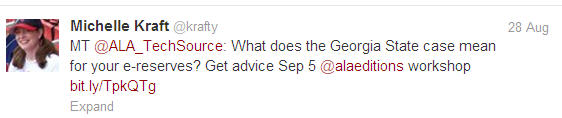
georgiatweet

hurricanetweet

CKtweet

As you can see all of that stuff is related to librarianship.  Doesn’t Twitter get all cluttered with junk about people’s cats, lunch, etc.?  Yes and no.  In fact, I do a little bit of off topic chatting…

baxtertwee

I am not a robot, some of my life and personality filters through on Twitter just like it does on email.  The key to Twitter is the you people follow.  Follow other librarians (medical and non-medical), doctors, patient advocates, technology gurus, etc.  Find the people who mainly tweet about professional items and your Twitter feed will mainly be about professional information that you can use.  Yes there will be some personal bon mots that fly through, but that is life.

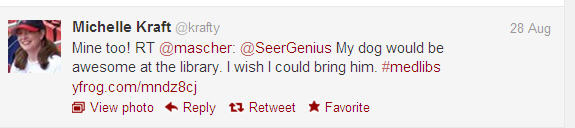
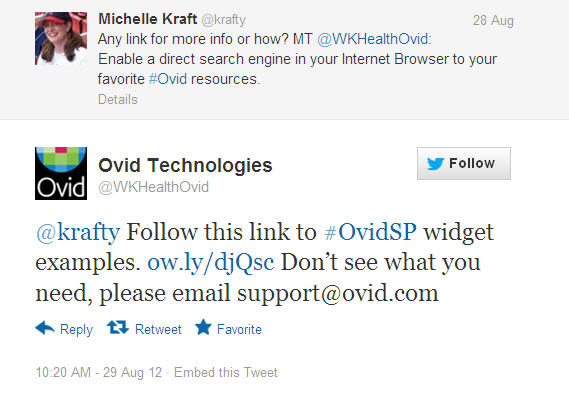
I have also found it HUGELY helpful to follow my vendors.  Yep, I follow @SpringShare, @WKHealthOvid, @EBSCOInfoSvcs, @NEJMTeam, @ClinicalKey, @MDConsult, @MHMedical, etc.  Not only do I find out about new things like I did the other day with Ovid…

ovidtweet

But I have gotten pretty darn good tech support and responses from problems and complaints.  Honestly I have gotten faster responses than I have ever gotten when I post on Medlib-l.   @SpringShare has been very helpful and responded quickly whenever I mentioned I have a problem.  @EBSCOInfoSvcs responded quickly when I was asking people about an A-Z quirk.  @ClinicalKey responded very quickly when I brought up an issue regarding personal logins for PDFs. 

Twitter isn’t for everyone but it isn’t just the realm of Charlie Sheen rants and lunch updates.  It is a valid method of professional communication.  The key is how you use it and how you integrate it in your workflow.  Next week I will share how I have integrated it into my work flow so that it takes no more time out of my day than regular email.  In the mean time, don’t forget about the #medlibs Thursday chats at 9pm est. which is a perfect example of professional Twitter communication.  You are free to lurk and see what is going on. Any questions about Twitter #medlibs chat feel free to contact me.

Medlibs Twitter Chat: Everything eBooks

This week I will be moderating the medlibs Twitter discussion that will happen Thursday 8/30 at 9pm Eastern for 1 hour.  (I hope I do as well as Nikki!)

Last week, we discussed and shared a link to the book, Rethinking the Reference Collection: Exploring Benchmarks and E-Book Availability.  This week will look at ebooks a little more in depth and their use in general, not just the reference collection.

Some ideas for discussion can be:

  • Findability -What are the best ways for patrons to find stuff? The catalog, A-Z lists, other?
  • Usability – How easy are they for patrons to use?
  • Usage – Are they getting used?  What is appropriate usage stats?
  • Portability and Devices – Where are people using them and on what devices?
  • Patron Driven Acquisition (PDA) – Who is doing this and what are your results?
  • Anything else that might be interesting

Anybody can join a medlibs chat, you don’t have to be a librarian, you just have to have an interest in the topic.  For more information on how to join a Twitter chat using hashtags check out this guide created by the usual moderator Nikki Dettmar.

I look forward to see you online this Thursday.  Even if you plan to lurk, please at least tweet us your name and where you are from (on Thursday at 9pm est.) so we can officially welcome you and answer any questions you might have.

Organizing eBooks

I feel like I am beating a dead horse when I mention the topic of ebooks, but it is one of those topics that I just can’t put to rest.  The reason I can’t put it to rest is because ebooks are wanted by our users but they are pain in the neck for librarians, users, and probably publishers too.  Users want downloadable books and unless a library subscribes to something like UnboundMedicine (which can be very costly) there aren’t a lot of options.  Most of our ebook providers still provide ebooks only via the web (you need a Internet connection either via WiFi or cell tower) to view them and they certainly aren’t downloadable. In addition to these physical barriers of ebooks, just finding them can be a challenge. 


Finding ebooks is like wandering through a maze but without the cool pattern.

Finding an ebook is like wandering through a maze but without the cool pattern.  In order to find an ebook medical library patrons must navigate the catalog or the web page or know the silo their specific title is hosted.  They run into more dead ends and switchbacks that it is frustrating and deafeating. Why?

The catalog is dead (but that is another blog post).  Users just really don’t search it.  They search Google or they will slog through the library website looking for ebooks to magically be listed.  We have so many ebooks from different vendor packages (McGraw Hill Access databases, StatRef, Ovid, Wiley, Springer, MDConsult, etc.) and it is pretty much impossible to create and maintain an accurate web list of the ebooks.We used to keep up  a web page on a title and subject basis  but with hundreds of titles (thousands once you add in OhioLink) the web list was impossible to maintain.  We also used to list our ebooks providers. We had a web page detailing that ebooks could be found at the following sites (then lsited all of the vendors like AccessMedicine, Ovid, StatRefe, etc.)   That wan’t helpful.  Users have no clue where each title is housed, so they don’t know to “just click on AccessMedicine to view the online version of Harrison’s.”  The big web page with links to AccessMedicine, AccessSurgery, OvidBooks, StatRef, Wiley, MDConsult, Safari Tech Books, was not helpful. 

Unfortunately we learned that we were thinking too much like a librarian when we tried to direct people to our ebooks.  What do I mean by this?  If you aren’t a cataloger think back to library school cataloging, and if you are a cataloger I appologize for my crude cataloging example.  We librarians have been ingrained to provide as many discover points to a resource that we can.  When we catalog a book we do it to the exact specific subjects (thus making a general subject search difficult) and we add all sorts of added titles, authors, subjects, etc. to make it more findable.  The idea is sound for cataloging, but it is VERY bad for web design and discoverability.  

We recently conducted a user survey of our website.  We knew it needed to be redesigned but we wanted to know how our users were trying to find things in order to create a better site.  The one thing that was stated repeatedly was that users did NOT want multiple ways for finding things.  They wanted one straight shot way and that was it.  As librarians we were brought up to try and think of all the ways people might try to find something and make it findable in those ways.  We designed our web pages that way.  It turns out our users viewed the multiple ways just like navigating a giant maze.  The added paths did not aid in discoverablity they just served as switchbacks causing user navigation confusion.

Because ebooks are in different silos and our users have abandoned the catalog, it is difficult to provide one single easy way of searching and accessing anything beyond a very small collection of ebooks.  EBSCO A-Z does now keep track of ebooks.  But that is such a new feature (released in 2011 or 2012) it is still really too new to be effective.  Batch uploading doesn’t keep author or subject changes/additions.  Information from the publishers is sometimes missing making the author search a crap shoot. We have consolidated the various ways users can find our ebooks down to two ways; search the catalog or search EBSCO A-Z.  Neither method is exactly ideal, somethings are in the catalog that aren’t in A-Z and somethings are in A-Z that aren’t in the catalog.  It isn’t the best method for finding ebooks, but it is an improvement over the multitude of ways we provided.  Still because I know my users are looking for ONE way to find ebooks, I am always trying to find out how other libraries best to do that. 

So how do patrons find your ebooks?  What methods are working?  What isn’t working?  Do they use your catalog?  If so how did you get them to use it and how do you keep up with the ebook changes?  Let me know your thoughts because I can’t be the only one banging my head against a wall when looking at ebook discoverablity.

PubMed Won’t Support IE7

According to the NCBI Website, the NCBI resources will no longer support IE7 after January 1, 2013.  So medical librarians in Internet Explorer institutions, now is the time to start talking to your IT departments to get IE 8 or greater, or Firefox 4 or greater installed on your computers.

This means that after January 1, 2013 if you are searching PubMed using IE7 and something goes wonky, it is your problem.  They will no longer design PubMed so that it will work using IE7.

For information on other browsers like Chrome, Safari, and Opera check out the NCBI browser check list.

On a medical librarian related note, MLA’s site gets fussy using IE 7 and 8.  Bascially Internet Explorer is a frustrating browser to design for because there is designing for the rest of the web then there is designing for IE.  I am told IE 9 is better, but it is probably worth trying to get Firefox or Chrome added to your computer if you can.  However, it all depends on your IT department and their policies.  So pick your battle to at least make sure whatever browser you are allowed to use is compatible for the NCBI resources.

**Update 8/21/12  10:48am)**

ACGME won’t work with IE7 after September 1, 2012.  For more information on other browsers and versions go to:
http://www.acgme.org/residentdatacollection/documentation/browser_requirements.asp

ClinicalKey Brief Review

Over on iMedicalApps.com I wrote a brief review on ClinicalKey.  The post is direct more towards doctors rather than librarians but it is worth a read through for librarians. 

Over here I thought I would include a few things that librarians might find interesting about ClinicalKey.

I have to say that the front page of ClinicalKey where it has two large squares “For Institutions” and “For Individuals” kind of confusing.  While testing the product we had a couple of librarians who kept clicking the “For Institutions” square to try and search the product.  But they were confused because they kept getting into information about ClinicalKey for Institutions.  They thought they were supposed to click the “For Insitutions” button to search because they were in an institution.  We had to explain to them you just type in the box and hit the search button.  As a a librarian who often fields questions from users, I have a feeling this will be confusing for our users.  I am not sure which blue box they will click on but the boxes are just so large and so close to the search box it implies there are different accounts for different users.  I understand Elsevier wants to market ClinicalKey to both groups, perhaps they can find a less confusing design to do that.

Access to PDFs currently is a two step process for users.  Recently (just after I submit my write up to iMedicalApps) Elsevier required an additional login to access the PDFs.  Basically users must create a personal login and password to access the PDFs even while on the insitutional account.  If you have read my blog or followed me on Twitter for any amount of time you will know that requiring additional logins to common (not customized) content is a barrier to usage.  Patrons understand if they want to save articles, images, or customize the content they have to create a personal login.  Patrons do NOT understand the need to create a personal login to access regular content just to read. 

They are often dissatisfied with this additional login and they do one if not several of these things:

  1. Don’t use it. They quit, they don’t bother trying to get the PDF.
  2. Yell at the library because “we don’t have the PDFs” because it is asking for additional login.
  3. Get confused and try using every other login under the sun that they know.
  4. Repeatedly call the library for the special login (which we don’t have because it is a personal login).

The big thing is though, users won’t use it.  Plain and simple.  Plenty of librarians have usage data to back this statement up.  Creating a login to view the PDFs is a barrier. 

Now it is also a barrier for copyright piracy, which is one of the main reasons Elsevier has instituted the PDF personal login requirement.  They are also using the login information to generate usage statistics. They said that this information could help us understand usage but I am unsure as to what usage statistics we as librarians really care about that are the personal login level.  Really all I care about is overall usage, resource usage (which books & journals are being used), etc. 

There have been some librarians who have expressed their displeasure over the PDF personal login requirement.  As a result Elsevier has said they are investigating other alternatives.  I look forward to them making alternative adjustments so that they can eliminate the personal login requirement.

Librarians are going to have really look at their needs and what they want.  ClincalKey is a very nice (almost) all inclusive Elsevier product.  Subscribers get 900 book titles, almost all of the Elsevier journals (Nursing is not in ClinicalKey) and a ton of videos and images from the Elsevier books.  However as I mentioned in the iMedicalApps article, ClinicalKey is a bit like trying to take a drink of water from fire hydrant, there is that much Elsevier information.  As a result, institutions barely using MDConsult or find MDConsult to a lot of information, might be ovewhelmed by not only the price but amount of content.  Institutions looking to subscribe to ClinicalKey really should have ways to manage the amount of information because it would be silly or downright negligent to not have an link resolver to handle finding all of the ejournals, an established method to handle finding the ebooks (whether it is your catalog, home grown system, or a link resolver that does ebooks).  If you don’t have an easy way to manage the fire hydrant of information then you shouldn’t be getting ClinicalKey in its present form. 

Other things that I think need to be addressed are downloading (for appropriate use) of ebooks and how they are dealing with the FirstConsult app. 

The writing is on the wall, the horse has left the stable, use whatever metaphor you want but users are now expecting to download ebooks to their iPads to read offline.  This needs to be build into the system.  FirstConsult isn’t the only product that hasn’t done this, McGraw Hill’s Access databases, Ovid, etc. have not figured out how to create a ebook product that will check out books for download to users.  I am not sure how they do that while still keeping it within the larger product like ClinicalKey or AccessMedicine, but this is something that must be addressed now because users expect this. 

I realize ClinicalKey is too new to really have an idea as to what they are doing regarding apps.  But there should be some sort of statement or direction as to whether the FirstConsult app will continue on as is, or whether they will change things and make it more of a ClinicalKey app with FirstConsult.  Like the downloadable ebook market this is an area where our uses have specific expectations. 

Those of you who have tried or bought ClinicalKey what are your thoughts?  Those of you who don’t have it and don’t plan to get it what are your thoughts and reasons? Write a comment either here or on iMedicalApps
Thoughts on extra login for PDF and Librarian’s thoughts on ClinicalKey.

New Roles for Health Sciences Librarians

Are you a health sciences librarian working in position that wouldn’t be considered a “traditional” health sciences librarian position?  If so then pay attention…. The Journal of the Medical Library Association has a special issue on New Century, New Roles for Health Sciences Librarians and they are seeking papers!  Papers must be sumitted by February 2013!

(from JMLA)

The advent of both digital content and new forms of communication has made radical changes in health sciences library users’ expectations for access to information. Researchers and clinicians expect information at their desktops, 24/7, in a format that can be easily digested and used. At the same time, in response to concerns over the increasing cost of health care, government funding agencies have changed their expectations for how health-related research is conducted. Funding agencies look for translational medicine and dispersion of information across disciplines and institutions.   

Responding to the opportunities provided by these changes, some librarians and libraries have changed their focus, no longer emphasizing libraries as keepers of the information universe but instead stressing their ability to provide expertise supporting those who work in the health information universe. A number of new paradigms have been reported at conferences and in the media: embedded librarians, e-science experts, support for translational medicine, and data curation and management. To help us gain a better understanding of these new paradigms, the Journal of the Medical Library Association (JMLA) is planning to devote the October 2013 issue to papers that focus on the outcomes experienced by those who have taken on these new roles.

Not sure you have enough “stuff” for a full length research article?  Don’t worry in addition to full length research papers they are looking for brief communications and case studies.

(Descriptions from JMLA)

Brief communications – 1,800 words or less, describe evaluations of either the need for or success of new roles. They should provide a brief literature review and describe the new role; the method used to assess the need for the role or to evaluate its success, such as a small scale survey, focus groups, or measures of user participation in services provided; and the results of that evaluation or assessment. Papers describing evaluations of education and training programs relevant to new roles are also welcome.

Case studies -3,500 words or less. Describe, in depth, new or innovative roles for librarians such as embedded librarians, e-science experts, support for translational medicine, or data curation should provide a brief literature review; describe the components of the new role and relate, if relevant, the institutional factors that supported the creation of this new paradigm; followed by an evaluation of the success or failure of the initiative and any lessons learned. Papers submitted as case studies must include evidence that allows the reader to judge the value of the librarian’s contribution in this new role, independent of the author’s opinion. Examples of evidence include results of a user survey, inclusion of the librarian in papers authored by a research team, improvements or changes attributed to a librarian in an open access journal, or continued financial support from or additional responsibilities assigned by the institution.

Full length research papers – 5,000 word limit. Investigating a research question related to new roles for health sciences libraries or librarians should use a standard quantitative or qualitative research design. Quantitative studies should employ a sampling methodology that allows extrapolation to the larger population. Examples in this category would be qualitative or quantitative studies evaluating faculty or clinician reactions to embedded librarians or illuminating the features of digital libraries that contribute to their success or a benchmarking study of librarian roles in Clinical and Translational Science Award grant–funded projects.

So if any of this is of interest to you OR you know somebody else who is a non-traditional health science librarian then you should totally pass this on to them and suggest they write something up.

Questions?
Please contact Susan Starr, editor, JMLA, at jmlaeditorbox[atsign]gmail[dotcom].  Further details on procedures for JMLA submissions and requirements for brief communications, case studies, and full-length papers can be found on the JMLA Information for Authors page. All papers should be submitted online at www.editorialmanager.com/jmla/.

ReferencePoint Blog Stops

About a year ago NLM launched ReferencePoint Blog targeting health sciences library staff in the U.S. and abroad.  The postings were intended to:

  • Increase the awareness of NLM products and services available online and onsite.
  • Inform the targeted audiences about health sciences resources outside of NLM.
  • Promote dialogue and learning exchanges between NLM staff and staff at other libraries.

Well according the final post, “blog membership and participation” was lower than anticipated and “lacked dialogue among the viewership.” 

Although the blog is gone, people can still find out about information from the Tech Bull, RMLs, NLM Social Media outlets, and from other libraries’ web and social media.

At first I misread the information about ReferencePointe Blog, I actually thought they were launching a new blog.  It wasn’t until I re-read things did I realize they were ending the blog.  I admit there is a lot that gets by me at times.  But I had no idea that ReferenceBlog existed and I do try to keep on top of that sort of thing.  It is sad that something that looked so promising failed, but I have to wonder what was done to promote it.  I did a very quick unofficial poll in the Twittersphere asking medical librarians if they had ever heard of ReferencePointe Blog.  I figured the librarians on Twitter are usually more in tune with blogs and social media and if something was out there maybe a few librarians might not know but the group as a whole would know about it.  Most of the people who responded to my tweet said they had either never heard of ReferencePointe Blog or just learned about it very recently.  One person who mentioned they knew of it said it was in her feed reader but she felt it unfortunately found its voice.

This brings up several very good points about blogs, social media, and communication. 

  • Market the hell out of your blog, Twitter account, Facebook, etc.  If your many of social media techie librarians did not know about you, then you didn’t reach out in the right ways.  Simply building a site or feed and hoping people will come or comment…those days are l-o-n-g gone.  Regardless if you are making a blog for librarians or Twitter feed for doctors, you are competing against a whole slew of other social media things that are louder and potentially more interesting. 
  • You need a voice.  Whether it is in 140 characters, a look/feeling on Facebook, or longer blog dialog.  Without a specific voice, theme, presence…overall vibe if you will, users won’t identify with you and come back for more.  It can take a while to find your voice, and possibly longer if you have several people who have to work together has one voice.  But without a specific voice or vibe it is difficult for people to follow.
  • Timeliness is EVERYTHING! The half life of a tweet is like 5 minutes.  Obviously blogs have a little longer half life but you really need to keep posts, tweets, Facebook content centered around what is currently going on.  For example in May 2012 PubMed changed Limits to Filters, a good post on a tricky search using Filters would have been great.  Discussing the differences, pros and cons, etc. of search with Limits vs. Filters would be very helpful.
  • Feeback is essential. Commenting, Re-tweeting, and wall posts must be open and easy.  Creating a barrier such as having somebody login to comment, locking your Twitter feed, or preventing wall posts will drastically limit your readership’s interest in communicating and will effect your overall readership.
  • Finally your numbers are only half of the picture.  I would like to think that I am pretty popular blog among the medical library community.  Yet I have only a few comments on my blog.  I have even less well posts on my Facebook page (to be honest I don’t really market my FB page).  I have a reasonable number of RTs, MTs, and @s on Twitter.  But I am no KevinMD.  However I bet his actual comments, RTs, MTs, etc. represent a very small fraction of  his oodles and oodels of readers and followers.  The numbers are only part of the story.  I don’t begrudge anybody for shutting down based on poor numbers but you can’t use the numbers as your entire picture.

So in the end, I am sorry to see that a potentially good resource is gone.  I hope that isn’t the end for people thinking of doing something similar.

PubMed Centeral Name Change

PubMed Central apparently was often confused with PubMed, so NLM has decided to change its name to just PMC. According to the Tech Bulletin PMC has a new look and feel to go with its new name. The redesign is an attempt to present a “cleaner and more uniform presentation across PMC’s site as well as its article, issue, and journal archive pages.” Pictures of the redesign can be seen on the Tech Bulletin page.

Other improvements include:

  • New links for article front matter such as article notes, copyright and license information
  • Views for tables and figures have been improved
  • Easier readability, navigation, and linking within the new article page
  • Enhance bibliographic citation look
  • “Go to” navigation drop down menu linking to sections within the article

Other improvements will be coming and will be featured in future Tech Bulls.

I have only one small gripe. It is with the changing of the name from PubMed Central to PMC. If NLM intended to try to eliminate confusion with PubMed, I don’t think changing the name to PMC will do it. Unfortunately, I feel PMC is still too close to PubMed and the name still doesn’t really tell people what the product is to differentiate it. It really needs a name that indicates it is an area that contains fulltext articles in PubMed. (Even that is slightly a misnomer because there are full text articles to journals not in PubMed…but only geeky librarians and NLM really know that.) Something like PubMed Full Text Archive, while not exactly short and sweet is more descriptive and less open to confusion than PMC.

Friday Fun: Technology from Yesteryear

A couple weeks ago I read John Halamka’s “Cool Technology of the Week” post which referenced this Boston.com article, “Technology from Yesteryear Nostalgia.”  John mentioned the article isn’t about the latest greatest coolest current technology but it is a fun look back at what was totally cool technology in the past, but now is:

  • Ancient: seen in museums only, unusable, unfixable
  • Antique: unusable, unfixable
  • Vintage: usable, old, ironic, cool
  • Outdated: still available in stores, but barely used

It is fun to look through the images and the descriptions because there are quite a few things on the list that I can remember having. (I had a bright yellow Sony sports walkman that was semi-permanently attached to my head all through high school and college, especially at swim meets.)

Not only is it fun to look through the list and reminisce, but I thought it would be fun to think of the library technology of yesteryear that was once cutting edge and cool.

Here is my contribution:


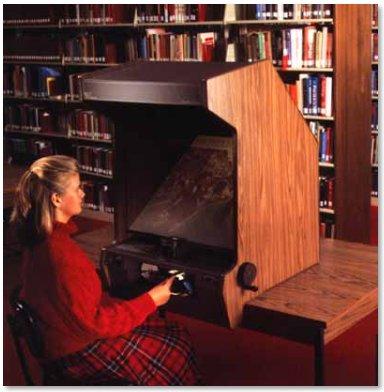
Microfilm Reader
Price: $0 (library cast off)  – $2600 (“new”)
Status: Outdated

I remember using these in my public library all the time because the catalog (shelf list, probably to be more accurate) was on these.  St. Louis County Public Library had 5-10 in each branch out in the open for people to find books (like we have our computers now).  It replaced the actual card catalog.  If I close my eyes I can hear the whirling  and see the blurry white streaks as I zoom through the alphabet of subjects.
I would say it is vintage, but since a lot places still use this for their newspaper and other print archives, I should label it outdated.  I am seeing less and less of them as more and more online news databases are adding their old stuff online.

What do you remember as a cool tech?  Have some fun this Friday and list it in the comments.