Ovid Users Get to Know the New OvidSP

I posted earlier this month that Ovid launched a new version of OvidSP.  The new OvidSP will be going live fairly soon, so it would probably be a good idea to be prepared before the switch. 

Here are some ways that you can prepare for the switch:

  • Go to the OvidSP Resource Center and click on the Training Center tab.  Ovid is offering new training sessions covering the enhancements made to OvidSP.  They have web-based instructor sessions as well as online tutorials. 
  • Quick Reference Cards, check it out online and order some for your library.  They are also great to use as a starting point for customizing your own library specific Ovid search cards. 
  • If you are looking for a quick comparison of Old OvidSP and New OvidSP there is a good side by side PDF available.
  • My Projects is a new feature in OvidSP and from what I can tell it is similar to PubMed’s MyNCBI but unlike MyNCBI you can store the full text in MyProjects. 

I plan on taking an more in-depth look at the new changes made to OvidSP within the next week or two and I will write more the changes at that time.

Books Citations in PubMed

Earlier this month the NLM Technical Bulletin reported that PubMed will soon be enhanced to include citations for books available on the NCBI Bookshelf.  I checked today and the the first books added to PubMed, GeneReviews and Essentials of Glycobiology are in the database.  Not only are the books as a whole in PubMed but citations for each chapter or section are also  included.  Each book in the NCBI bookshelf including their chapters will be added.

The PubMed display will be slightly different for the books and the bulletin does a great job of describing the changes.  The changes are mainly related to the fact that it is displaying a book, not an article.  As a result, links like “Related Articles” have been renamed to “Related Citations.” 

Searching for books in PubMed is different, see the bulletin for best methods.  It is important to note while searching for books or book chapters that they are NOT IN MEDLINE and WILL NOT have MeSH terms.  I am extremely conflicted with this.  I like the idea of having the NCBI bookshelf in PubMed but I think it creates a bigger problem.  While we librarians know that PubMed is technically not MEDLINE, the idea is a difficult concept for normal users, especially when we library professionals often use the terms interchangeably.  MEDLINE has been so entwined with PubMed and very few people see the difference.  It is wrong, there is a difference, but go find a normal medical library user that knows this. 

To have books from the NCBI bookshelf in PubMed but not MEDLINE is going to confuse the vast majority of users.  Based on that, you would think I am not in favor of this new addition to PubMed.  On the contrary, I think it is long overdue. Great the NCBI bookshelf is on PubMed, but what about all of the other books out there?  Personally, I would love to see books from LocatorPlus added to PubMed.  I think it is high time we have a medical literature database that covers articles as well as book chapters.  But for that to be effective the books and the chapters should be indexed and added to the MEDLINE database. 

I am forever telling people that books and book chapters (as well as published abstracts) are not in MEDLINE so searching PubMed won’t retrieve them.  I am going to have to change my search help elevator speech, because this is no longer the case.  There are now a few books in PubMed.  The NCBI bookshelf is only a drop in the bucket of books published and having those books and no other books in PubMed, not even MEDLINE, muddies the waters. 

I know the folks at NLM see this as a way to increase access to the NCBI bookshelf, but I just see it as another way librarians are not thinking of their users. If they were thinking of their users then they would start to add the LocatorPlus books into MEDLINE and index them so researchers can find them and request them from their libraries.  I realize this is a huge undertaking but we need to start thinking like our users.  Most of our users want information, and they want one place to find it.

MLA President and Board Members

Recently the MLA membership elected Jerry Perry as President elect and Rikke Ogawa and Marianne Comegys to the MLA Board.  If you are like me and you sometimes forget what you had for breakfast then you might want to read the blog posts each of them did on MLA Connections and get to know them a little bit better.  Not only will you learn a little bit about their professional activities but you will be directed to Jerry’s video clip about his personal interests, learn how to pronounce Rikke’s name, and find out about Marianne’s goal to attend a championship event in every sport.

Speaking of MLA Presidents and Board Members, the MLA Nomintating Committee posted a call for nominations for MLA President-Elect and MLA Board.  So if there is somebody you think you want to see representing the membership as the President or a Board Member go on to MLA.net, check out the current and past Presidents and Board Members, and send in the name of somebody you would think would be good to the Nominating Committee.  Your submission must be done before May 5, 2010, please read the call for nominations for more details.

Facebook Changes and What it Means for Libraries

Yesterday, April 21, 2010, was Facebook’s F8 developer conference and Facebook announced some pretty major changes that will affect how people use the Internet and how librarians might want to adjust how their library websites appear to the average use and how searching might eventually be different. 

There are a lot of websites out there that are discussing these new changes and it took me several tries to find some I could understand.  Pocket-lint has a great post by Dan Sung  and Search Engine Journal post by Selena Narayanasamy spell out the changes simply and succinctly for normal people. 

Facebook is launching several social plug-ins embedded in other web pages that will send users to things in Facebook about the site you were originally looking at. 

Sung uses CNN as an example.  If you go to CNN you will notice on the right hand side a gray bar saying Friends’ Activity and underneath it (if you are logged into FB) you will see what your FB friends are recommending and sharing.  Another type of plug-in Snug mentions is the Like plug-in now displayed on outside websites like IMDb.  Once the person clicks the Like thumb, their FB picture is listed with their name saying the and X amount of people like this.  That information is then added to your Recent Activity stream area of your Facebook page.

In my case it now has the thumbs up image and says “Michelle likes Raising Arizona (1987) on IMDb.

This makes FBs Like button very similar to Delicious or Digg and very powerful.

Sung also reports there is a Recommendations plug-in that is similar to your Activity Stream but it will suggest “relevant content based on the site you’re looking at.”  According to Search Engine Journal, uses an algorithm to analyze things you have favorited (as well as thing things your friends have favorited) and uses that information to recommend other things you might like.

There is the Log in plug-in which merges your other membership sites with your Facebook profile.  Sung says, “you’ll be able to hit the Log in widget on another site which will then give you information from your Facebook network as well as your other friends that are registered for this site.”  This is probably because Narayanasamy Facebook will be getting rid of Facebook Connect. 

Finally for the plug-ins there is the Social Bar which will show Facebook friends on the saem outside site and allow them to chat and show their “likes.”

I am not saying any or all of these plug-ins need to be on your site at this exact minute, but think of the opportunities to have the Social Bar on your library site so patrons can communicate with librarians.

Open Graph is confusing and I am not sure I completely understand it, but I will try and describe it.  It is a social platform for searching the Internet.  It is supposed to provide individually specific Internet search results based on what that person most likely is looking for.  The reason I am having a hard time grasping this is because it is supposed to be more than just the traditional approach of typing in a search term and getting results, which anybody anywhere can replicate and get the same set of results.  This Open Graph semantic and is more personal because it will be based on things that you have “liked.”  What I don’t understand is how this will work.  Often times I “like” totally different things than what I am searching for on the Internet.  As a medical librarian I do a ton of searching for medical information that I don’t ever tag that I “like” on FB.  As a normal person I do the same thing for non-medical things.  For example, we are looking to buy a new car, I have been researching cars, pricing, strategies, True Market Values, safety ratings, etc.  I have yet to tag (and probably will never) any of those sites with “like.”   So I am not sure how Open Graphs will work but if it flies then we as librarians have a whole new method of searching for information.

Docs.com is the Microsoft Office suite version of GoogleDocs on Facebook.  Facebook users will be able create, share, and edit documents with each other and together.  InformationWeek reports that Docs.com is intended to expose younger Facebook users who have grown up with the web and are beginning to use things like GoogleDocs to Microsoft Office in an online way instead of software in a box.   “Think of Docs for Facebook as the gateway drug to Office 2010.”

Facebook just released announced these changes yesterday, but already after reading through some non-techno jargon articles, I see some real changes for the web and quite possibly how librarians use it and maintain their web sites.
Library of Congress Collecting Twitter Feeds

Last week the Library of Congress Blog announced  that it acquired the entire Twitter Archive.  Anybody who has ever sent a tweet publicly, their tweet along with the billions of other tweets will be housed in the Library of Congress.  Major events such as the controversial Iran elections, Barak Obama, and the Hudson River plane will be collected along with the tweet I recently sent about renewing my AHIP.  (Hey Mom, something I wrote is in the Library of Congress ;).) The noteworthy and not-so-worthy all together on about 5 terabytes of digital storage. 

So why on God’s green earth would the Library of Congress be interested in something like Twitter?  Well that is part of their mission.  They collect everything and digital is just one area of collection.  According to “Q&A: Twitter Goes to the Library of Congress” on the Wall Street Journal blogs, Matt Raymond, communications director at the LoC said a congressional mandate requires them to identify and aquire materials that are “born digital.”  These items would be web pages, blogs, government records, data sets, etc. 

When you apply that mandate, Twitter would be one of those things that was born digital. It also doesn’t hurt that the folks at Twitter actually contacted the LoC about their data and whether it would be of value. 

To me there is little doubt that there are definite nuggets of sociological gold, but researchers will be have to do a lot to separate the wheat from the chaff because there is also a lot of unimportant chatter out there, like my AHIP tweet or the tweets about somebody’s breakfast.  I wonder how people will access this stuff and how they will do it in a way that makes sense.  To view President Barak Obama’s tweet after he won the Presidency is relatively easy to do, you just look at his account.  Following the thread of chatter about an event such as Hudson River plane might be a little more difficult but doable if there are certain common words or they used a hashtag.  Just think, we will be able to look through the archive of tweets happening at the MLA meetings.  However, there are a lot of other tweets that are still floating around in those 5 terabytes of data, and I have no idea how somebody can find logic within that mess. 

It will be interesting to see how it all works out.  I don’t think we will know for quite a few years what value the archived tweets hold, if any.  I am glad the LoC is collecting electronic information.  It makes me wonder what NLM is doing.  I am not criticizing NLM, I just would like to know what kind of electronic information are they collecting.

MLA Early Bird Deadline Tomorrow

Tomorrow, April 21st is the deadline to register at the Early Bird rate for MLA in Washington DC. 
The deadline to be an Official Blogger is TODAY April 20th, and Official Videographer is due  April 30th.

If you are going to MLA this year, it is about time to sit down with your planner (online or paper) and figure out your schedule.  MLA’s Online Program Planner will have the details on most of the scheduled activities. 

If you want to get in a little sight seeing or other non-librarian type activities, check out Kathel Dunn’s post  on behalf of the LAC Hospitality Committee for things to do in D.C. that require some advanced planning.  Sarah Cantrell has a great post about bicycle sight seeing  in D.C. on a tour or on your own.

As many veteran attendees know, a lot of MLA activities are unscheduled and are equally interesting and fun.  There are librarian rock concerts (Bearded Pigs Sunday May 23rd. Hilton 8:00-11:00pm) vendor parties, and possibly some tweet ups. 

Information on the unofficial news and unscheduled events can be a little hard to come by.  Like Kathel who didn’t find about the food court behind the hotel in Dallas until the last day of the conference, there are plenty of times where I was unaware of things or events.  In order to try and keep on top of those ephemeral unscheduled things you will want to think about doing some of the following:

  • Watch your snail mail and email!  Most of the vendors your library subscribes to will be sending out information about lunches, dinners, parties, prizes at their booths, etc.  Don’t delete it or toss it without looking at it. 
    *These are great way to meet other librarians using the products and to discuss issues, new products, etc. with the vendors.  I have yet to win anything at the booths but I have had many great discussions in the
  • Book mark the MLA ’10 Official Blog on your mobile device. If you don’t have a smart phone check out the blog at the Internet cafe.
    *Based on past experience, many of the posts are done during down times and in the evening, so it might not be ideal for up to the minute info.
  • Follow the MLA ’10 Official Twitter feed.  If you are already on Twitter and want to contribute to the group feed don’t forget to turn the feeds on your account from Private to public (you can switch it back to private after the meeting) and use the #mla2010 hashtag.
    *Twitter is definitely up to the minute, but if you aren’t used it it, you might find there is a small learning curve to sift through the chatter.  Best way to monitor it is either on your laptop or mobile phone.  Not as effective if you check it sporadically at the Internet cafe.
  • Join MLA’s CrowdVine to connect and chat online with others at meeting. Currently some Lost loving librarians are seeing if there is any interest in watching the series finale as a group.
    *Totally new this year, so I don’t know how exactly it will play into distributing news and information to people.

MLA has a nice Conference Community pagelisting other online ways to connect to the conference and try and stay on top of everything that is going on.  And of course there is always the low tech but very enjoyable and effective method of networking and talking to people face to face.  I can’t tell you how much I enjoy meeting all the different people at these meetings.  It is so nice to connect a name (which I may only see on MEDLIB-L or other online place) with the face and the person.  It’s great to hear them talk about  issues we are facing, success stories, and humorous anecdotes.

If any body has any other unofficial events or information they would like to share or suggestions for finding out about what is going on, please comment.

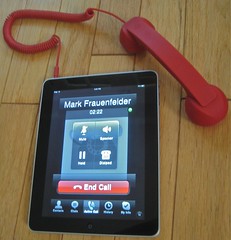
Friday Fun: Use Your iPad as a Phone


Moshi Moshi Phone

Originally uploaded by mak1173

You bought a new iPad, but you are still carrying around that dinky little 4.5 x 2.5 inch outdated piece of technology called an iPhone because you still need a phone.

Never fear Mark Frauenfelder at BoingBoing  found out that the folks from Native Union created the retro looking Moshi Mosi 01H handset that can turn your iPad into a phone while using VOIP. According Native Union, “the Retro Handset combines classic style with a contemporary edge and is finished with a luxurious soft touch texture.”

Makes a great gift for those you are into steampunk or who subscribe to the whole one ring mantra.

“One Device to rule them all,
One Device to find them,
One Device to bring them all
And in the technology bind them.”

I think I will stick with my iPhone and spend my time trying to score a pair of Dots gloves.

Free Class on Health Literacy for Public Health Professional

The CDC has created a free “Health Literacy for Public Health Professionals Online Training” program to help educate public health professionals about issues with health literacy (patients and the public lack of health literacy) and their role in addressing it. 

The CDC is offering a free online course which can be accessed any time any where you have a computer with Internet access and 1-2 hours of spare time. After taking the course health professionals will have a better understanding of the significance of health literacy and will learn practical steps to deal with health literacy daily. 

This course qualifies for continuing education credit for nurses, physicians, pharmacists, health information specialistis, etc.  

Go to the training program at:
http://www2a.cdc.gov/TCEOnline/registration/detailpage.asp?res_id=2074.

Program must be completed before 9/14/2011 to receive credit.

Getting Around/To the MLA Conference Hotel

Last week I was in Washington DC for the Allen Press 2010 Emerging Trends in Scholarly Publishing Seminar and I thought I would scout out the conference hotel for next month. 

Originally I mixed up my Washington DC Hiltons and erroneously thought the Hilton I was staying at last week was the conference hotel.  (Both Hiltons are in middle of construction/restoration of guest rooms which is what helped cause my confusion.) After discussing locations and logistics with other librarians on Twitter I quickly realized my mistake.  I grabbed the tennies and decided to walk to the conference hotel and check out a few things.  Here are some of the things I learned.

The conference hotel is the Hilton Washington at 1919 Connecticut Avenue NW.  It is a 25-30 minute walk to the White House.  Lots to see, eat, and buy on that walk, should you decide go.

Dupont Circle has a lot of cool restaurants, bars, shops, and is a very vibrant busy area.  The closest Metro station to the hotel is Dupont  Circle.  It is about a 10 minute walk of approximately four blocks. The walk from the station to the hotel is up hill.  It is not like climbing Mt. Everest but it may (or may not) be a factor with your luggage from the airport, or if you are commuting in from another hotel each day.

A Rite Aid pharmacy is across the street from the hotel (it is on Connecticut) should you forget something at home or want to buy a cheap bottle of water or snack.  (I always seem to forget saline solution, tooth brushes, or my make up foundation gets confiscated at the airport, so it is nice to have a pharmacy nearby.)

I encourage everybody to stay at the conference hotel, but if that is not possible for some reason, there is a Courtyard Marriott directly across the street from the Hilton. 

You have your choice of three airports to fly into; Reagan National (DCA), Dulles (IAD) and Baltimore/Washington (BWI).  Both Reagan and Dulles are in Washington DC, they are often more expensive to fly into and they can be very hectic on Fridays or break times when members of Congress are trying to get home.  BWI is often cheaper to fly into but you need to plan for plenty of travel time to/from the airport and the hotel.  According to Bing Maps the drive is technically 48 minutes, but clearly you would have to be in a flying car (ala the Jetsons) to make that kind of time.  The traffic between BWI and DC is very heavy.  It can sometimes take 2 hours to get from one to the other. 

DC has very good public transportation.  You can use it to get from any of the airports to the conference hotel. I suggest using the Metro Trip Planner if you are going to use the Metro. If you are flying into BWI or Dulles you will have to take the Metrobus for about a 1/2 hour ride to a Metro station and catch the subway train(s) to Dupont Circle.  You don’t need to take the Metrobus for Reagan National.

Other ground transportation you can take to get you from the airport to the hotel are taxis and SuperShuttle.  Taxis from BWI and Dulles are expensive.  BWI is about $100 one way. Dulles is about about $60 one way.  Reagan is cheaper and at best guess it is around $20 one way. (All the fares are from the taxi companies’ sample rates.)  If you don’t want to use the Metro and you don’t mind riding in a shared van, SuperShuttle is cheaper than a taxi.  From BWI it is about $37 each way.  From Dulles it is about $29 each way and from Regan it is $14 each way.  The nice thing about SuperShuttle is that you can book your round trip ahead of time online and you can always find a coupon code online to knock a few bucks off the fare.   

Final note: Washington DC is a walking city.  Think of comfy shoes if you are planning on doing any walking anywhere.

Want WiFi at MLA?

Tired of using your laptop as a wifi divining rod?  Too busy to apply to be a Type 1 Official Wireless Blogger?  You might be interested to know that MLA staff have negotiated a 10% discount on wireless aircard rental from Event Radio Rentals for MLA members attending MLA 2010.  Sarah McCord posted information about the aircard and discount at the MLA’10 Official Blog.

So how much does an aircard cost after discount?  According to Sarah it is approximately $12/day plus shipping.  They offer 24/7 toll free technical services if you have any problems. 

Check out Sarah’s blog post and Event Radio Rentals, if you are interested in wifi.  If you decide to use them make sure to add “Medical Library Association Member” to the Company Field in the Personal Information Section so they can keep an eye out for us.