Don’t Know Much About eScience?

So what were you doing on January 20, 2011?  If you were attending the GMR’s webinar on eScience then you are ahead of the game.  If you are like me and can’t remember what you had for breakfast but are pretty certain you didn’t attend the webinar then you will be happy to know that the program recording and resources are available on GMR’s Online Education page

About the course:

e-Science is an emerging research methodology with an emphasis upon data and networks. As researchers in biomedicine and other health-related disciplines increasingly utilize today’s technology in their work, they produce immense amounts of data that can, ideally, be shared and repurposed to speed up scientific discovery. Similarly, they use networking tools to find, develop and work in a collaborative environment no longer constrained by geographical limitations. Can health sciences librarians with their skills in information management and organization, as well as success in building partnerships across areas, find a role in this new area? The answer is “YES!” Presenter: Sally Gore.

Unfortunately there was a audio problem during recording BUT it was captioned.

Windows 7 Phone in Medicine

The new smart phone on the block is the Windows 7 phone.  I have to admit I kind of like their ending bad phone behavior with a better phone, themed commercial, because we have all been there, either as the phone user or the one saying “really?” 

Whether you believe a “better phone” is the answer to our bad phone behavior (and whether that phone is a Windows 7 phone) is debatable.  What isn’t up for debate is that people bounce from phone to phone.  Cell phones now days are disposable.  According to a 2007 Business Week article the average cell phone was replaced every 18 months.  That was primarily before the emergence of the smart phone.  Yeah sure the Blackberry was around but the smart phone tsunami had hit with the introduction of the iPhone.  Cell phones back then were still relatively cheap.  It is hard to think really that a $400+ smart phone device is disposable.  According to an article on MSNBC it still remains to be seen if consumers are as willing to change their smart phones as often.  But people there will always people who are going to change them (me possibly being one of them) for some reason and there are still quite a few people buying their first smart phone. 

So I was happy to see iMedicalApps post, “Physician developer’s experience with moving his popular iPhone and Android medical apps to Windows Phone 7.”  As the author mentions, the Windows 7 phone is still extremely new so there are a lot of medical apps available on the platform.  Although it should be noted that Unbound Medicine recently announced the availabilityof their products for the Windows 7 phone.  (My guess is that the iMedicalApps post was written just slightly before Unbound Medicine released their Window 7 products.)

Because the phone is so new and as a result there is a lack of medical apps available, I am not sure I can recommend the phone yet. The iMedicalApps post reminds us there are now some deeper considerations to investigate before we move to a new smart phone platform.  Doing a search on Google will give you many results for switching from one phone platform to another and the pros and cons (particularly moving from iPhone to Android).  However, if you are using the phone for work, one of the biggest considerations would be the portability or availablity of mission critical apps. 

I am in the process of seriously considering moving from my iPhone 3G to a new Android.  The reason for me is $$.  I am having a hard time stomaching a $160 bill for 2 iPhones (mine and my husbands).  I am seriously thinking of going with Virgin Mobile’s Android phone which is $40/phone for unlimited data, text, and 1200 minutes on the Sprint network.  That would cut my two smart phone bill in half.  Is this a good idea?  I don’t know, I love my iPhone and the experience, I just hate the bill.  So in a few months once things have settled down (switching cell phones just before delivering a baby is probably not a good idea) I will make the decision.  One way other other I will let you know why I moved or didn’t move.

Share Your Elevator Speech and Win a Nook

We have all heard about creating that all important elevator speech on the benefits of the library to institutional power players and others.  Having a quick little speech is also helpful in regular social situations, being able to tell a person you just met at a party what you do without having their eyes glaze over or hearing another joke about the Dewey Decimal System is a nice thing.   Your speech has got to be quick and to the point, yet convey a whole lot of meaning, because people are busy and they don’t have time to hear you wax poetically about the finer points of MeSH (plus we are probably the only people who know and care that MeSH is Medical Subject Headings not a woven fabric).

Well the folks from the Cancer Librarians Section have created a video contest to showcase “tried and true” elevator speeches. 

Check out the details below (from MLANet).

To encourage participation of those librarians who may or may not be able to attend MLA ’11, the program will include video submissions. While public services, reference, clinical medical librarians, informationists, library directors/managers, and other frontline people may be those who might normally use an “elevator speech,” think about ways you might send out a consistent message when answering questions on budgets, access issues, and anything else. Let those viewing the submissions know how well your message works!

Videos submission will be accepted until February 11, 2011.

A peer-review panel will judge the videos. The top nine videos submitted will be shown during the program session. All submitted videos that meet the length requirement will be available after the conference on the Cancer Librarians Section YouTube Channel. 

What will determine the top nine?      

  • Technical requirements (good lighting and sound, length requirements met)
  • Content
  • Originality

At the program session, those attending will have the opportunity to vote for their favorite three videos. A combination of the peer review ranking score and the program session participation votes will determine three prizes that will be delivered after the meeting. Certificates of participation will be given to all those who submit a video that meets video guidelines. 

  • First Prize: Barnes and Noble NOOKcolor
  • Second Prize: Barnes and Noble $50 gift card
  • Third Prize: Barnes and Noble $25 gift card

To submit a video complete the form and then email your video. If the form is not completed, then the video cannot be loaded to the mlacls2011 channel (due to legal issues). Videos must be received and the form completed by February 11, 2011.

Video Guidelines

Videos must be no longer than three minutes. Elevator speeches should be no more than 30–60 seconds of the video. Spend the remaining time quickly describing the reception of your elevator speech. Videos must be in Apple QuickTime Movie .mov, AVI Format .avi, Windows Media Format .wmv, or MPEG Format .mpg or .mpeg formats. You can film your elevator speech and comments on your iPhone or other mobile device. Informal videos are fine but please ensure that there is adequate lighting and that you are clearly audible on the video. Videos over three minutes will not be reviewed for inclusion in either the 2011 MLA Cancer Librarians Program session or the Cancer Librarians YouTube Channel after MLA.

We encourage larger libraries with many hospital and other smaller libraries around to host a Recording Day. University of Texas MD Anderson Cancer Center is encouraging librarians to bring their speeches and reflections to their research medical library on January 14, 2011. They will record the videos and give a copy of the video to the person. That individual will have to actually submit the video. However, keep in mind that the videos do not need to be studio productions.  Good lighting and sound and meeting the other guidelines are the only technical requirements. The speech and how the message was received are the more important parts of the video judging criteria.

Interested in learning more about revitalizing your message?  Explore the resources on elevator speeches bookmarked at http://tinyurl.com/CLSMLA2011-Bookmarks. These resources include tools for creating an elevator speech and the positive and negative reasons for using an elevator speech.  

Want to see an elevator speech? View Julie Esparza’s elevator speech. She uses this message when new faculty, residents and medical students join the internal medicine team each month. If you have any questions feel free to contact Stephanie Fulton, chair-elect and program planner for the Cancer Librarians Section Program.

So whip out those flip cams and upload your video to YouTube, you just might be able to score yourself a Nook while helping other librarians.
Good Example of Phrase Searching in PubMed

Just like some people like their cars to have a manual transmission while others prefer automatics, librarians tend to fall into one of two MEDLINE camps, those who prefer Ovid and those who prefer PubMed. 

I am an Ovid kind of gal.  Don’t get me wrong I can do a PubMed search and have done them and still do them frequently when I need to, but my MOC (MEDLINE Of Choice) is Ovid.  Since I am in Ovid often enough I tend to see and remember better certain things in my daily searches that might be good teaching methods or examples . 

Because I am not in PubMed as often as Ovid, I don’t have the experience of running across good search examples that I can pass on or use while teaching.  That is why I try and pay particular attention to good PubMed teaching examples as the come up.  I either try and blog about them, tag them, or print them off and save them for later. 

The NLM Technical Bulletin has a nice example of how to do effective phrase searching in PubMed.  This is nice because certain things like “text messaging” (their example) are best searched as phrases.  As the Tech Bull notes it is important to look at the Search Details to know whether your term is being applied in the MEDLINE database as you want/think it to be. 

Really I tell everyone when I teach PubMed to look at the Search Details.  Sometimes I wonder how much they really do that or whether the nodding of their head is not in agreement with my point but instead to the beat of some song they have stuck in their head.

New NLM Site Not Designed for Older Browsers?

Yesterday I reported that NLM redesigned their website and I mentioned that I kind of liked the design.  Today people on MEDLIB-L are reporting problems viewing the site.  The biggest complaint (and a valid one) is that they see blue links on a blue background.  What they should see is this image as displayed on the Technical Bulletin, instead they see this which is clearly difficult to read.

Is this a browser issue?  I would think it is.  The people who are reporting this problem seem to have IE 7 or lower.  I have IE 8 and all of my computers are IE 8 so I really can’t confirm whether it is browser incompatibility issue.  I have Firefox and the site does well on Firefox.  However as one person pointed out on MEDLIB-Lthis could also be a style sheet loading problem, they recommend going into Tools and changing the check box for formatting documents using my style sheet. 

As I said I don’t have IE 7 on any of my computers, so I cannot verify if this is a fix or not. 

What perplexes me slightly is why NLM would design a site that is not very compatible with IE 7?

UPDATE: I logged into my email on 1/13/11 and there was a post on MEDLIB-L from a person at NLM.  According to the email, they are actively investigating the problem.  Prior to the launch they did test the site on IE 6,7,8, and 9 beta as well as Firefox, Safari, and Chrome.  They did not see any issues prior to the release.  However, there are some IE 7 users who are seeing this problem.

They want your help identifying the cause.  If your home page looks very different from the image at http://www.nlm.nih.gov/news/nlmhomepage_2011.png contact them at customer service email or their contact page http://apps.nlm.nih.gov/mainweb/siebel/nlm/index.cfm

Please give a detailed description of your IE version and operating system. 

NLM Has New Web Site Look

The National Library of Medicine’s home page http://www.nlm.nih.gov has a new look.  The new look is designed around “your top tasks.”  I don’t know when they say “your top tasks” whether it is customizable directly by the individual user, uses cookies or some other programming to customize the page indirectly based on your usage, or if they are using “your top tasks” to mean the general public’s top tasks (most frequently used links).  My guess and please correct me if I am wrong that it is most frequently used links design method.

According to their news release, they ” updated thousands of pages within the site,” included top navigation to popular links, and added social sharing functionality so users can share content to people through Facebook, Twitter, and social bookmarking services. 

I like the new look and feel, but I have to admit the times I go to NLM’s site is when I am trying to get to databases which are featured prominently on the left hand side. I don’t go to the site for new or other things all that often because I already subscribe to their RSS feed, Twitter feed and Facebook.  So it should be interesting to hear how others who use the site a little differently like the re-design.

What Will 2011 Bring to Medicine or Medical Libraries?

I decided to take a little bit longer break from blogging and online life than originally intended.  The holidays set me back a little bit and I had to catch up work and at home.  But I am back and will be posting regularly until the beginning of February sometime.  Why then?  For those of you that don’t know, I am expecting my 3rd child and (cross my fingers) I will be on maternity leave then.  

As the new year has started and I have experience or will be experiencing some new things in 2011, I thought it would be interesting to come up with a guess list of what 2011 will bring for medicine or medical libraries.  This is meant to be a brainstorming list and I will start it off but feel free to comment and your thoughts.

Shrinkage – More and more libraries will experience a loss of space or re-purposing of this space.  This not new but I think we will see an acceleration in this area.  Even my own library will be facing it this year, something I don’t think I would have ever expected when the built the “new” library about 12 years ago.  Shrinking footprints is never an easy thing to think about right away but in reality it may not be as horrible as you might think.  The first instinct is to react in fear but good results can come out of it.  It all depends on the approach(es) you and your institution approach the situation. 

Smartphone volatility – The smartphone market is booming and Verizon’s poorly held iPhone secret will just add to the ever expanding phone and network choices for consumers.  With the expanding use of smartphones comes the increase in medical apps.  More doctors will be carrying smartphones and will want to use their favorite medical apps at the bedside (or at least in the office).  Unfortunately many hospital IT departments have been slow to adopt smartphones for clinical use or to allow them on their wifi.  Personally the Great Lakes were formed faster.  IT’s glacial pace combined with medical professionals desire to use the phones will make for some interesting institutional culture clashes.

Facebook and Twitter appetite – These two sites will continue on their gobbling up of other social application sites.  Perhaps not directly but indirectly.  RSS feeds and Delicious were huge a few years ago, now Bloglines and Delicious have gone the way of the dodo or were sold to other companies and are clinging to life.  The main reason for these sites demise, people don’t use them like they once did.  They collect, organize, and share stories through Facebook and Twitter.  Power users will always miss them but the vast majority of internet users have moved on.  I know they have been saying the blog is dead and I have agreed the traditional blog is dead.  However I see Facebook taking over more of the non traditional blogging and I also see it replacing the common website.  More and more hospitals are seeing increased traffic via Facebook, they are now measuring it along with the traffic they get from Google and they are paying attention.  Traffic from Facebook to institutions is growing a lot.

So what are your thoughts?  What do you see happening in 2011?

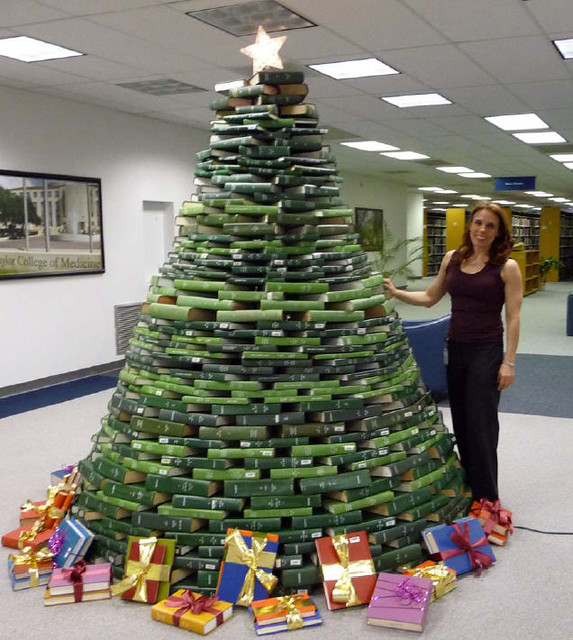
Happy Holidays: Build Your Own Bookmas Tree

In case any of the librarians in your library want to get into the holiday spirit and are looking for something beyond holiday window clings, take a look at Texas Medical Center Library’s Bookmas Tree.

They even have a “How To” guide available should you want to try it in your own library next year.

photo
Enjoy the holidays with family and friends, I will resume posting after the new year.

Facebook and Twitter: 2010 social demographics

So if you had any questions as to who is on Facebook and Twitter, this graphic  from DigitalSurgeons.com (technology company, not actual surgeons) shows some interesting information about Facebook and Twitter users. 

Of the 500 million Facebook users 41% login every day and almost a third of them log in through a mobile device.  Women use it a little bit more than men, and the 18-34 year olds are the biggest users representing 52% of the usage combined.  This interesting and I am starting to notice real world examples supporting the average usage age.  In my personal life I am starting to notice that some in this age group will answer Facebook messages more often than regular email. 

Twitter is a fifth of the size of Facebook with only 106 million users.  A slightlyolder crowd uses Twitter, the 26-44 year olds are the largest group at 57% combined.  Only 27% of the users login every day but of those that login over half (57% update their status).  While only 25% of the users follow a brand on Twitter, that group is extremely loyal, 67% of the followers will purchase that specific brand.  Compare that with the higher number of brand followers on Facebook (40%) who are less loyal and purchasing that specific brand (51%). 

So what does this mean for libraries, medicine, and hospitals?  One look at the age tells you that Facebook and Twitter are not solely the realm of teenagers.  Adults are using it and make up the largest group of users.  So it stands to reason that our library users are on Facebook and Twitter.  Reaching out to them with the right message in the right way is the next step.  This may sound like a far fetched idea, but if users continue to use Facebook more than email, do we need to look at ways to send them overdue notices?  Just one thought.  Medical schools and residency programs already are recruiting people through Facebook.  Medical schools and well endowed hospitals track through Facebook or have Facebook pages to facilitate donations.

Brand loyalty is something that is extremely important to hospitals.  Hospitals are always looking at ways to get new patients, keep the ones they have, and measure patient satisfaction.  For example, not only will good HCAHPS scores mean more physical money to the hospital, but satisfied patients are more likely to return and less likely to go somewhere else for another procedure.  I am not trying to compare Twitter loyalty to HCAHPS scores, I am just saying that brand loyalty is extremely important to hospitals and Twitter is just another example illustrating how some people show their brand loyalty. 

Should you run out and create a library Facebook or Twitter account?  Well not if you don’t have a plan or reason to use it, but you shouldn’t dismiss it either or think of it as something just for people who work with teenagers.

Android Marketplace to Have Medical Category

Searching for medical apps for smart phones can be a bit of a pain.  It seems like medical professionals when browsing for good apps need to sift through the thousands calorie counter apps before they can find something like Epocrates.  To try and make things a little easier, iTunes created a medical category which is separate from the health and fitness category.  It is isn’t fool proof, there are still some apps that get thrown into the medical category which really don’t belong, but in general it helps.

It appears that Android users will soon have a medical category too.  According to iMedicalApps, Google is set to launch a medical category for Android Market apps this week.  Additionally, they report Google is asking developers to send larger screen shots of their apps for Android Marketplace which has caused some to speculate that Google is planning to put Android Marketplace online. 

If it is indeed true, this will help Android using health care professionals find appropriate medical apps.  Librarians might want to keep an eye out for when this goes live so they can add it to their list of resources (if they keep track of smart phone resources).