Personal Disaster Management

I live in a suburb of Cleveland, OH and we used to joke all the time that besides snow storms there really wasn’t much from an natural disaster standpoint that would hit us.  Nobody really thought a hurricane would effect us.  Yeah we would get a lot of rain, but it would be like any other bad storm…right?  Wrong.  Sandy uprooted or split trees causing them to fall on power lines, houses, across streets, etc.  Leaving large areas of the Cleveland area without power for 6-7 days. Areas without power that relied on pumps to either pump water out of locations (as in sump pumps in basements) or pump up to locations (water pumped to upper levels of apartments) had lots of problems. 

I am not trying to minimize the East Coast’s damages from Sandy.  Many people there have huge problems, you probably don’t think much about losing power for 6 days when your house has been swept away.  I wouldn’t even know where to begin if that happened.  But I thought I would take a bit of my blogging time to share some things I learned while out of power for 6 days, hopefully this can help you. 

Note: This is primarily about personal prep for disasters, if you want information for your library check out NLM’s Disaster Information Management Research Center and the latest #medlibs chat transcripts on disaster management.

Things I Learned:

IF you have a sump pump it is totally worth it to get at least one of these two things: generator or water powered sump pump. If you think your battery backup will be fine, it will, but for only 6-12 hours.  So if the power is out for longer and you don’t have generator or a water powered backup sump pump you are either bailing, or your basement is wet.  We had a battery backup. It stopped after 6 hours. Everybody mentions generators or the water power sump pumps as being too costly for those once in a while events. “Consumer Reports’  generator tests show that you can start powering a houseful of lights and appliances for less than $700.”  Our plumber gave us a quote for a water powered back up sump pump for $600-$800, installed.  So if we get both (which we will) $1500 in prevention is worth it compared to the several thousand dollars a flooded basement costs.  Go to Floodsmart.gov to get an idea of how much even 2 inches of water can cost.

Look at your insurance now.  I think most know that regular home owners insurance doesn’t cover flooding from a river, ocean, lake, etc. coming into your house.  That type of coverage if you want it must be purchased in additional to regular home owners insurance.  However there are many who don’t realize regular home owners insurance does NOT cover flooding due to sump pump back ups or sewer back up.  You need to get a special rider for those to be covered.  The costs per month are based on your selected monetary coverage and are usually a minimal increased monthly fee. 

Generators shouldn’t be exposed to the elements.  There is lots of information out there about not having your generator in your garage (its carbon monoxide will kill you), but there is little information about not leaving your generator out in the rain or snow.  Since a bad storm is usually what kills the power, that storm might continue a few days when you need to operate your generator.  The USFA and FEMA recommend operating it on a dry surface under an open canopy like structure.  They also warn NEVER to plug the generator into your home (aka backfeeding) that kills people. Plug your appliances into the generator with extension cords. Only a transfer switch (installed by an electrician) is the appropriate and safe way to have your generator power your house without using extension cords.

Best flipping flashlight I have ever used is the Coleman Quad LED Lantern. It is very bright and each quad of can be detached and used as a personal flashlight, leaving the rest of the lantern lit for others.  Very handy. It takes D cell batteries, we used it a lot over 6 days and the batteries did not die on us. (Don’t know how much life they have left so I did pick up another pack of Ds at Costco).  You can buy it for cheaper than Coleman’s site.

If you decide you have to leave or your just tired of not having power and want to stay in a nearby hotel, make that decision quickly.  The nearby hotels were full after the second day.  We did not stay at a hotel (had to keep the camping generator power the sump pump) but others who did told me that some offer storm rates and other help for people affected by the storm.

If your cell towers are down and voice and data are slower than a snail, then you might want to try texting to get your information.  Check out How to use the Internet when the Internet is gone for tips on how to get email, Google, and news tweets by using text. 

Food in the fridge. Ugh. When in doubt pitch it out.  But here is a general guideline for you to use. 

Heat…I can live without air conditioning but no heat is such a problem.  If you have a generator that can handle your furnace and you have it hooked up properly to prevent backfeeding you are golden.  For the rest of us, remember to get your chimney cleaned (don’t want a chimney fire to add on top of your power outage) so you can have a little warmth from the fireplace.  Getting the chimney cleaned was on our “todo” list which hadn’t been done before Sandy.  Previously we were warned it was very dirty and would be dangerous if we had a fire, so we learned our lesson. Regularly clean your chimney.  If it is below freezing and you are worried about pipes freezing let a small trickle of water flow through the taps.  Thankfully it wasn’t that cold in Ohio following Sandy, but those out East got socked with a snow storm following Sandy. 

Gas up your cars and portable gas tanks before the storm.  The long lines in New Jersey and New York are a reminder of that.  Consider getting a generator that runs on propane instead of gasoline. 

Kids…. School will most likely be cancelled for some time.  If the weather is nasty or if there are still downed power lines in the area, they will stuck indoors with you without power.  Get creative.  I am not creative and the boys were nearly trying to kill each other every 5 minutes while the 2 yr old girl hit them both with her sippy cup.  You can only do so many board games.  We ended up going to friends houses with power for long play dates.  We went to the rec center to play baskeball and swim.  We went to a movie.  It wasn’t just the fact that we had no power, it was the fact that we had no power and we couldn’t always go somewhere to do something due to weather or trees or power lines being down. 

I realize this is long, I hope some of it was helpful.  If you have any ideas you want to share please comment.  I know I didn’t cover everything you should consider in times of a disaster, these are just some of the things I learned from this event.
Vote for MLA Leadership

Now with the Presidential election over with, it is time for MLA members to set our sights on voting within our membership.  This is the membership’s opportunity to help guide the direction of MLA.  By electing the MLA President, Board of Directors and the Nominating Committee the membership chooses who will represent MLA and the members and its future.

The position of President is an easy concept for members, but Board of Directors and Nominating Committee aren’t always as clearly understood.  The MLA Board of Directors are people who “act on behalf of the membership according to the (MLA) mission statement, goals, and objectives, and strategic plan within parameters of the bylaws.  Direct business of the Medical Library Association (MLA), establish policies and procedures, foster the growth and development of MLA.” In a nutshell the Board of Directors act on bahalf of the MLA members, represent MLA, and work really hard to continue the growth and development of the association.  The Nominating Committee are nine people who select MLA members to run for President and Board of Directors. 

Before you vote, make sure you look at the people who are running.  You can do this at http://www.mlanet.org/members/mla_news/2012/nov_dec_12/index.html

Make sure you vote! You have until December 7th.

Getting The Internet During Disaster

Hurricane Sandy sucker punched the Cleveland area last week leaving me and others without power for 6 days. As frustrating as it was to deal without power, a very cold house, no fridge and rising sump pump waters threatening to flood my basement, I was lucky.  We were safe and my house was fine (no falling tree damage or worse). Additionally there were pockets of areas within the Cleveland area that had power back on within a day or two.  So while we were without power, I could go to the neighboring suburb rec center to warm up, charge my phone, and let the kids run around the basketball court or swim in the indoor pool. 

We also had a basic little camping generator that we used to power the sump pump intermittantly and to power a TV or recharge cell phones.  (Remember it is a camping generator, it was meant to power a small TV and light. A sump pump definitely had it at its limits.)  We have been off cable and satellite for almost 2 yrs.  We get our TV over the airwaves and use Netflix or Amazon on Demand to get other cable type programs.  We have AT&T Uverse for phone and Internet, just not TV.  We save a bundle doing this.  We also learned that it can also help in an emergency.  Sandy not only killed the power but it killed AT&T service as well as other cable and phone providers.  That meant no Internet for us, but for a large portion of our neighbors that also meant no TV as well as no Internet, even if they had power.  With only a small radio, you feel cut off from the outside world. 

Thankfully we had our cell phones and we could charge them.  While Sandy took out a bunch of cell phone towers, there were still enough left  for us surf and find information via 3 and 4G.  However, this is not the case for many on the East Coast.  With fewer cell phone towers left standing and a larger population, people’s smartphones aren’t very smart.  People aren’t always able to call somebody, their data stream has gone down to a data drip and their battery is quickly moving toward dead because the phone boosts battery power to try and help the signal.  The only thing that works is good ol’ reliable SMS texting. 

However texting can only do so much. Right?  Wrong! I read an article yesterday about how people can leverage SMS texting to surf the Internet (Google), get email, even use Twitter and Facebook.   Doing this allows you to stay in touch with events without relying upon your phone needing a decent data stream from a cell tower.

How to use the Internet when the Internet is gone” is a good step by step article on how to do all of the things I mentioned.  Some things like Facebook and getting your email via text requires you do some things while the Internet is still up, so if you did it Monday morning before the storm, or if can find a place where you can get online then you can set yourself up.  Google and Twitter doesn’t need any advanced set up, it can be done all via texting.

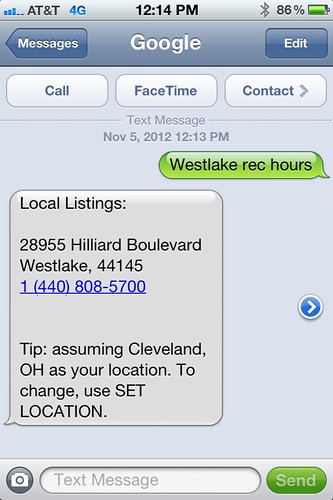
Here is what I got when I Googled the hours of the rec center in a nearby suburb.

googletTextphoto

While I didn’t get the hours I did get the phone number to call them.  It isn’t perfect but if you can’t even get online, it is better than nothing.

I am not sure how medical libraries can leverage this information to help provide services during a disaster.  However it is something good to know and librarians might want to add it to their disaster plans or at the very least let their users know about it.

Disaster Preparedness

Hopefully I will resume posting in the next week.

Monday night Hurricane Sandy hit the East Coast.  Because it was such a big storm, its outer circle came over Cleveland.  What made matters worse for Clevelanders was we were already dealing with another storm at the time.  So Sandy and our storm overlapped in sort of a venn diagram to create a bigger storm that hit Cleveland.  I am not trying to minimize the destruction that hit New Jersey, New York or the rest of the East Coast.  I am just explainning that the combination of the other storm and Sandy made for a stronger storm that you normally don’t see as far inland as Ohio. 

As a result Monday night was interesting.  We had sustained 40 mph winds with frequent gusts at 70 mph (hurricane strength) which snapped trees in half, uprooted trees from saturated ground, ripped off siding, bent flag poles flat, etc.  We lost power at 10pm Monday night.  After seeing a neighbor’s tree split in half and fall across the road we worried about the two large trees in front of our house and moved everyone to the first floor family room to sleep.  Thankfully our trees stayed up.

It is Wednesday and we still don’t have power.  Cross your fingers we get it soon because I don’t know how many more nights I can go waking up every 3 hours to run the little camping generator to power our sump pump to keep our basement dry. 

I have learned a lot about what works and what doesn’t for personal disaster planning.  After some time, power, and rest I might post about the things I learned so that others can benefit.

Don’t Forget Join an MLA Committee

People have asked me on different occasions how they can become more involved with MLA.  They have also asked how can a person new to the profession or the association get to know other medical librarians.  The simple answer is they need to get involved.  The easiest way to get involved is to join an MLA committee. 

(from MLA Focus)

Joining an MLA committee is a great way to become an active participant in the decisions that impact the profession. As a committee member, you could evaluate applications for awards and scholarships; plan membership recruitment strategies, continuing education courses, and the annual meeting; participate in shaping MLA publications; make recommendations on new technology; and more. Apply using the online application form for the 2013/14 association year. You will need your MLANET username/ID and password.

Never served on an MLA committee before? See the August MLA News for tips from President-Elect Dixie Jones, AHIP, on how to increase your chances of being appointed.

The deadline to submit your commitee application is Oct 31st.

So take 5 min. out of your day fill out the application and submit it.

Confusion on NLM’s Policies for PMC, PubMed, and MEDLINE Inclusion

Over at the Scholarly Kitchen, Kent Anderson writes of his frustrations regarding PMC, PubMed and MEDLINE and non indexed journals (particularly the start up journal eLife) in his post, “.”

I find myself both agreeing and disagreeing with Anderson. 

I agree there is a big problem with the blurring of the lines in the minds of most people (mainly doctors and researchers) regarding PMC, PubMed and MEDLINE.  PubMed houses the citations for PMC articles as well as the citations to articles in journals indexed within MEDLINE.  The problem is that to most normal people PubMed = MEDLINE.  I mention the blurring of the lines between PubMed and MEDLINE in post “Back Door Method to Getting Articles in PubMed: Is Indexing so Important?”  In my post I mention that doctors and researchers think of PubMed and MEDLINE as the same. I likened it to ordering a cola.  “PubMed and MEDLINE have become the Coke/Pepsi of medical databases.  Two different products but people use the terms interchangeably when ordering a cola soft drink.”  I even posted the email of a researcher friend further illustrating how they don’t distinguish between PubMed and MEDLINE and if the article is PMC it is in PubMed and that in their minds it is in MEDLINE.  At the time of my orginal post I questioned the point of actually indexing journal articles since researchers don’t search by index terms and they erroneously think PubMed is Medline.  All they have to do is get into PMC and it can be found in PubMed via keywords (which is how everybody searches these days).

Anderson’s main argument is NLM is acting as competitor to publishers and technology companies, by allowing certain journal publishers to bypass rules for inclusion into PMC and PubMed.  In his argument he brings up the journal eLife a “fledgling funder-backed journal” that was allowed include articles in PMC despite not having published the required 15 articles, not being indexed in MEDLINE, and PMC acting as the sole provider of the articles.  Not only is NLM circumventing the rules for inclusion to its databases but he believes that NLM is acting as the primary publisher to eLife because their articles can only be found on PMC.  Anderson uses JMLA and Journal of Biomolecular Techniques as other examples of journals that NLM acts as the primary publisher.  I don’t know anything about the Journal of Biomolecular Techniques but I disagree with JMLA serving as an example similar to eLife.  As I mention in my comment to his post on Scholarly Kitchen, JMLA has been around since 1911 so it has fulfilled the 15 article requirement and is published by a publisher (who is not PMC) and sends me the print 4 times a year. The journal is indexed in MEDLINE (since 2002).  Additionally the printed edition clearly states that the digital archives of JMLA are on PMC.  I went to PMC today (October 22, 2012) and the October 2012 issue is not available.  So the most recent issue is not online and PMC is acting as the a digital archive. Therefore NLM is not acting as the publisher of JMLA in the way he describes. In the case of JMLA NLM’s PMC is the secondary publisher that he describes, which is the case of many indexed MEDLINE journals. 

Unfortunatley I think Anderson’s argument misses a bigger issue.  The question of quality within the PubMed database.  As I mentioned there is confusion among PMC, PubMed, and MEDLINE.  People searching PubMed will find an article from the PMC that is in a journal that is not indexed in MEDLINE.  However people will erroneously think the article and and journal are in MEDLINE when in fact they are just in PMC.  By allowing non indexed journals into PMC, NLM is basically allowing a back door into PubMed, and by default into MEDLINE.  Of course NLM doesn’t see it as that, because they are one of the few people who can still see a distinction between PubMed and MEDLINE.  Their users (doctors and researchers) do not see the distinction.  To them PubMed is MEDLINE.  This calls into question the quality of the articles in PMC in journals that are not indexed in MEDLINE.   If the journal isn’t good enought to get into Medline then why is the article good enough to be found in PubMed? 


Not All Hospital Libraries Are For Patients

I recently read several articles by an author that made the erroneous assumption that the “average user” for a hospital library is the public and that hospital library websites should be easily accessible to them.  The problem is  the author doesn’t realize the average user for a hospital library isn’t necessarily the public.  The average user for many hospital libraries is the hospital employee.  The doctors, nurses, physical therapists, social workers, etc. who work in the hospital are the average users.  The hospital’s Internet site is designed for the public.  Libraries are where their average users are and for many hospital libraries that isn’t the public Internet site.

For example, the library for Energizer doesn’t have a web presence on the company’s website. In fact, if I hadn’t met the librarian at Energizer, I would never have known they had a library if I browsed their website.  The reason, the average user visiting the Energizer website is not that library’s user group.  The employees are the library’s user group and they probably have an internal network for employees to access the library resources and contact information.  The same principle follows with hospital libraries.  If a hospital library’s mission is to serve the employees of that hospital then their resources should be easily accessible to the employees.  If a hospital library serves patients then it should be easily accessible to patients and the public.  The problem is, not all hospital libraries serve patients! Therefore, not all hospital libraries will have have pages on the insitution’s website, because the institution’s website is directed at patients not employees.

Many large multi institutional hospitals have patient education departments that provide patient information resources that can be accessible to the public (or as the author likes to keep saying the “average user”). These large multi institutional hospitals with patient education departments have libraries that usually serve the employees who treat the patients.  These libraries usually don’t serve the patient directly.  For example, part of my library’s mission statement is “to provide information to support patient care, research, education, and administration to all employees.”  Patients are not our user group, employees are our user group.  It doesn’t mean that a patient can’t use the hospital library, it just means that the resources aren’t geared toward them and aren’t licensed for public use.  Since they aren’t licensed for public use they might be behind the hospital’s firewall on the Intranet or they might be on the library’s Internet site in an area frequented by employees not patients.

So for one to comb through various large hospital’s websites looking for the hospital library’s page to be easily accessible to the “average user”, is a waste of time.   The average user isn’t patients!  Therefore, they don’t design their site nor place it in a spot easily accessible to patients searching the hospital website.   Their average user is the clinician who is in the electronic medical record (EMR) or Intranet site WAAAAY more than the hospital’s public Internet site.  These libraries are designing their access sites for their average users, employees. So if your premise is that this lack of Internet accessibility for the public (which you keep referring to as the average user) renders the hospital library invisible thus diminishing the importance of the hospital medical library in the eyes of hospital administrators and clinical staff, then you are dead wrong.   You are dead wrong because the average user is the employee and they don’t use the hospital Internet site like patients.   

I am not against web site or library accessibility studies.  Accessiblity studies are very important, but only if you study the right user group.  Remember the first thing we learned in library school, know thy user.

Share Your Tools

Have a cool tool, website, article, or idea that you think other medical librarians could benefit from?  The MLA Technology Advisory Committee (TAC) is working to help shape MLA’s social media presence by promoting and mentioning things that are useful to medical librarians.  One idea was for people to share what things they find useful for their job and then we would mention it on MLA Facebook or other social networking venues.  Basically create a crowd source resource that can be distributed to others. 

Sharing your cool tools has never been easier.  There are several ways you can do it. 

  • Tweet #mlatools with your favorite or newly discovered tool.
  • Comment on my blog or EagleDawg’s blog and mention MLA Tool somewhere in the comment.
  • Post on the MEDLIB-L email list and mention MLA Tool in the subject line.

Our hope is that we develop a repository tools, ideas, websites, etc. useful to medical librarians and we can profile them on our social sites for people to learn about and further discuss.


Win a Trip to MLA 2013 in Boston

NN/LM Middle Atlantic Region members, you have a chance to win a trip to MLA 2013 in Boston!  It all centers around National Medical Librarians Month which is right now, in October. 

(re-posted from the MARquee)

MAR would like to celebrate medical librarians in our region. National Medical Librarians Month gives information professionals an opportunity to market their services and highlight their contributions to research, education and improved patient outcomes. Are you doing something to celebrate Medical Librarians Month? If so, share your story by sending to nnlmmar[atsign]pitt.edu. If applicable, also share a photo depicting your activities/events.

MAR will be collecting your stories and highlighting them in our blog and weekly postings throughout October. All those that submit a story before Oct. 31st will be entered into a random drawing to receive an award to cover registration and airfare to MLA 2013. Please, only one entry per library.

NOTE:  There has been a change to the entry rules.  Multiple entries may be received from the same library, but only ONE entry per person.

I love these kind of opportunities and I wish there was a central area where medical librarians could look up all possible funding opportunities to attend the annual meeting.  So, if you are a Chapter, Section, or other group giving away a scholarship, grant, contest, etc. to attend the 2013 MLA Annual Meeting, please email me or comment and I will post it on my blog so that more people know about it.  Please don’t consider my blog to be the central area to find this sort of thing, so if you are advertising or search about funding opportunities please make sure you look in multiple places.  I just want to promote them as best as possible, so people who don’t get institutional travel money have one more place to read and find out about them.

Is NetVibes Your All In One Social Media Resource?

A while ago I discussed the usefulness of third party apps like Hootsuite and TweetDeck for integrating Twitter into your workflow.  Twitter apps like Hootsuite or TweetDeck vastly improve the social nature of Twitter.  Due to their design they allow people to better participate and follow tweets and conversations than the website Twitter can.  If you decide to use Twitter for professional communication I highly recommend finding a third party Twitter app like HootSuite or TweetDeck.

Catherine Voutier approached me shortly after my post, about using Twitter on Netvibes.  I am a Netvibes user for my RSS feeds and while I know they have a Twitter integration, I always used the integration to share stories from my RSS feeds with people on Twitter.  I had never considered using as I would TweetDeck or Hootsuite.  I was intrigued, so I asked Catherine to write up something about her experiences and I repost it here.

Catherine’s Netvibes and Twitter:

I first came about Netvibes earlier this year when I took up the challenge of Library Day in the Life, hosted by Bobbie Newman. This biannual project captures the daily doings of librarians working in all sorts of information environments across the globe. Many social media tools are used and to keep track of them, Bobbie created a public Netvibes dashboard. Netvibes is a monitoring tool which can be used to capture social media updates, rerun search alerts in search engines, keep track of new videos in YouTube and other services, and it can even keep track of incoming emails from various accounts. I was redesigning the evidence section of the RMH library website and I had left the various RSS feeds and other alerting services til last. I hadn’t included videos at that stage either. What could I use to bring all of these together? I tried using Yahoo Pipes but various experiments were unsuccessful. Then I remembered Netvibes – perhaps that would work? So I created an account and made a public page. It was immediately populated with items which were not useful so I went about redesigning it. There are tabs across the top which cover individual social media tools: Twitter, Podcasts and Videos. To add a new page, click on the + on the top right. The tab will be highlighted and this is where you can choose layout. On the top left is a button which says ‘Add Content’ – this is where widgets and feeds are located. You can also add pages that are already populated by choosing topics. To select a widget, click on it and it will ask you if you want to add it. Once added to your dashboard, click on the wheel to edit content. You can easily move the content on the page around by click and drag.

I then read Krafty’s post about using Twitter in everyday workflow and how she prefers to use third party software to read and send tweets. I thought – I wonder if I can use Netvibes to read Twitter conversations? I have a Twitter account but didn’t use it because of its clunky nature. I had to find instructions on how to do it but once I did, it was easy enough to replicate. This is how I did it: I made a basic page for myself and added a Twitter widget to bring up my own account. I then dragged and dropped Krafty’s name onto a blank section of the screen which brought up all her tweets. Krafty participates in a #medlibs chat on Twitter that has had some promotion and she participates and sometimes leads, so it was bound to be mentioned. Looking through Krafty’s tweets I found the #medlibs conversation link and dragged and dropped that onto an empty space on my dashboard – success!! Hooray! Now I can’t wait until the next live chat happens.
 
Below is a snapshot of my still-to-be-completed Netvibes page:
 
Catherine Voutier is the Clinical Librarian at the Royal Melbourne Hospital Health Sciences Library.  http://www.netvibes.com/evidencedirect
Catherine also posted about her experience (also has better, clickable image of her Netvibes page) at http://enhancinghealthcare.wordpress.com/2012/09/11/twitter-redux/
Interesting!  It definitely gives me some ideas as to how to use Netvibes.  I am kind of busy these next two weeks but I may just try and play with it while I am traveling to Chicago later this month while waiting in the airport.